
Most students do not have time to manually calculate grades or decode complex grading charts. Whether you are checking a quiz score, estimating your final grade, or planning what you need to pass, speed and accuracy matter.
The Easy Grader calculator simplifies this entire process in seconds. By entering just the total number of questions and correct answers, students instantly see their percentage and letter grade—no formulas, no confusion, and no wasted time.
In this guide, you will learn what the EZ Grader is, how students use it step by step, when it is most useful, and whether it works for quizzes. You will also discover why students prefer it over manual calculations, common mistakes to avoid, and how it supports both parents and educators in tracking academic performance.
What Is the EZ Grader?
The EZ Grader is an online grading tool. You enter the total number of questions and how many you got wrong. It instantly shows your percentage score and letter grade.
Originally, teachers used a physical slide-wheel EZ Grader in classrooms to calculate scores quickly. Today’s online version delivers the same results. It is faster, more accurate, and work for any test size.
There is no need to memorize formulas or use a separate calculator. Simply enter two numbers, and the EZ Grader handles the rest instantly. If you want to understand the concept behind it, What Is an Easy Grader? covers the full history and how it works under the hood.
How Students Use the EZ Grader: Step by Step
Step 1: Get Your Test Back
Your teacher hands back a graded quiz. You see red marks but no final percentage. That’s the most common moment students reach for an EZ grader.
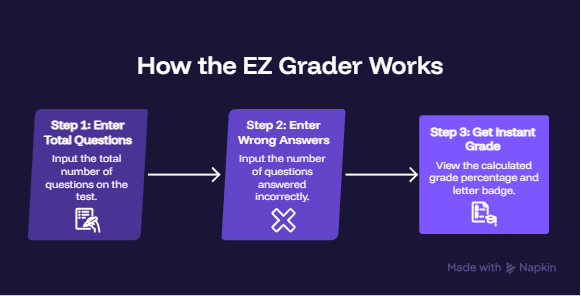
Step 2: Enter Total Questions
Type the total number of questions on the test. A 20-question quiz? Type 20. A 40-question exam? Type 40. The tool handles any number, including decimals for partial credit.
Step 3: Enter Wrong Answers
Count your incorrect answers and type that number in. That’s it. You don’t add up the right ones. The calculator does that automatically.
Step 4: Read Your Result
Your percentage and letter grade appear instantly. You also get a full grading chart showing every possible score for that test size.
Example: You got 6 wrong on a 30-question test.
- Correct answers: 30 − 6 = 24
- Score: 24 ÷ 30 × 100 = 80% (Grade: B)
No math required on your end.
When Do Students Use It Most?
Students use the EZ grader in three common situations:
1. Right after getting a test back You see the wrong answers circled but no final score. Plug in the numbers and know your grade in seconds.
2. Before a test is returned Some teachers grade in front of the class. You can follow along and calculate your score before they even hand it back.
3. To double-check a teacher’s math Grading mistakes happen. The EZ grader helps students verify their score quickly, without having to ask awkward questions.
EZ Grader Score Chart: Quick Reference
Here’s how scores map to letter grades using the standard USA grading scale:
| Percentage | Letter Grade | GPA Points |
|---|---|---|
| 90–100% | A | 4 |
| 80–89% | B | 3 |
| 70–79% | C | 2 |
| 60–69% | D | 1 |
| Below 60% | F | 0 |
This is the same scale used in most K–12 schools across the United States.
EZ Grader for Common Test Sizes
Students ask about specific test sizes all the time. Here’s what the calculator gives you for the most common ones:
| Test Size | Wrong to Get a B (80%) | Wrong to Pass (60%) |
|---|---|---|
| 10 questions | 2 wrong | 4 wrong |
| 20 questions | 4 wrong | 8 wrong |
| 25 questions | 5 wrong | 10 wrong |
| 30 questions | 6 wrong | 12 wrong |
| 40 questions | 8 wrong | 16 wrong |
| 50 questions | 10 wrong | 20 wrong |
The Easy Grader calculator generates the full chart for any test size automatically.
Does the EZ Grader Work for Quizzes Too?
Yes. It works for quizzes, tests, worksheets, and homework.
The tool doesn’t care whether it’s a 5-question pop quiz or a 100-question final exam. The formula is the same every time.
The only situation where the EZ grader doesn’t apply is weighted grades. If your final course grade counts quizzes at 20%, homework at 30%, and tests at 50%, that’s a different calculation. For that, you’d use your syllabus to calculate a weighted final grade instead.
Why Students Prefer the EZ Grader Over Manual Math
Manual grade calculation often seems simple until small errors start affecting your results. Converting scores like 23 / 30 into a percentage requires multiple steps, and even a minor miscalculation can lead to an incorrect grade.
The EZ Grader eliminates this risk entirely. Students only need to enter the total number of questions and incorrect answers, and the tool instantly delivers accurate percentages and letter grades—no formulas, no guesswork, and no wasted time.
For a clearer comparison of speed and accuracy, see how it stacks up against traditional methods in Easy Grader vs Manual Grading, where real examples highlight the difference.
Can You Use It for a Whole Class?
The Easy Grader is designed for one test at a time. That’s perfect for students checking their own score.
If you’re a teacher grading 30 students at once, that’s a different need. The Class Grader and Bulk Grading vs Individual Grading guide are built specifically for that workflow.
Common Mistakes Students Make When Using an EZ Grader
The tool is simple. But a few small errors still trip students up.
Entering correct answers instead of wrong ones This is the most common mistake. The calculator asks for wrong answers, not correct ones. If you scored 18 out of 20, enter 20 for total and 2 for wrong. Don’t enter 18.
Miscounting the red marks Count every marked question carefully before entering the number. Skipping a crossed-out answer by accident gives you a higher score than you actually earned.
Using the wrong total If a test has 25 questions but your teacher only graded 20, use 20 as your total. The total should match exactly what was graded, not the full length of the paper.
Expecting it to calculate a course grade The EZ grader handles one test at a time. It does not factor in your homework score, quiz average, or attendance. For a full course grade with weights, that requires a different approach entirely.
Rounding wrong answers before entering them Some teachers give partial credit, like 0.5 for a partially correct answer. Don’t round that up or down. Enter the exact number, including decimals. The calculator handles it.
Avoiding these five mistakes means your result is accurate every single time.
How Does the EZ Grader Help Parents and Educators?
Students aren’t the only ones who benefit. Parents and educators use it just as much, and for different reasons.
For parents: Understand your child’s grade in seconds
Your child brings home a test with 7 red X marks on a 30-question paper. No percentage written anywhere. You don’t know if that’s a B or a D.
Enter 30 total questions and 7 wrong. The result shows 76.7%, which is a C.
Now you know. No guessing. No waiting until the next parent-teacher conference.
Parents also use it to check whether a grade on a report card matches what came home on graded work. If the scores don’t add up, that’s a conversation worth having with the teacher.
For teachers: Verify a grade before you write it down
Teachers grade fast. Mistakes happen, especially after marking 30 papers in a row. A quick check in the Easy Grader before writing a score takes three seconds and eliminates errors.
It’s also useful during parent-teacher meetings. When a parent questions a grade, you can show the calculation on screen right then. Transparent, instant, no debate.
For school staff and administrators: A shared reference point
Substitutes, classroom aides, and tutoring staff often grade work without knowing a school’s grading system well. The EZ grader gives everyone the same standard result, based on the USA 10-point grading scale used in most K–12 schools.
If your school uses a different scale, the Grading Tools Hub has tools built for a wider range of grading situations.
The bottom line: whether you’re a parent checking homework or a teacher closing out the day’s grading, the EZ grader removes doubt and gives you a clear answer in seconds.
Final Thoughts:
The EZ Grader simplifies one of the most common academic tasks—calculating grades—into a fast, accurate, and stress-free process. Whether you are checking quiz results, estimating final scores, or planning your next study move, it gives you instant clarity without the need for manual calculations.
By understanding how and when to use it, students can make smarter academic decisions, avoid common grading mistakes, and stay more in control of their performance. It also serves as a practical tool for parents and educators who want quick insights into student progress.
Try the Easy Grader calculator to calculate your score in seconds, or explore more helpful tools at the Grading Tools Hub designed for students, teachers, and parents.
________________________________________________________________________________
Resources
- National Center for Education Statistics (NCES) — Digest of Education Statistics: Grading in U.S. K–12 Schools. nces.ed.gov
- U.S. Department of Education — Understanding Your Child’s Report Card. ed.gov
- College Board — GPA and Academic Performance in High School. collegeboard.org
- EasyGraderHub — Easy Grader vs Manual Grading: Which Saves More Time. easygraderhub.com/easy-grader-vs-manual-grading/
- EasyGraderHub — What Is an Easy Grader? Every Teacher’s Guide to Faster Grading. easygraderhub.com/what-is-an-easy-grader/
Frequently Asked Questions
How do I calculate my grade with the EZ Grader?
Enter the total number of questions and how many you got wrong. The EZ Grader instantly shows your percentage and letter grade—no manual calculation required.
Can a student use the EZ grader without a teacher?
Yes, completely. Students enter their own wrong answer count after getting a paper back. The Easy Grader calculator runs on any phone or computer, no teacher account or login required
Can the EZ Grader handle partial credit or decimal scores?
Yes, it supports decimal values. If your test includes partial credit (e.g., 0.5 points), the calculator will still provide accurate results.
What is considered a passing grade?
In most grading systems, 60% (Grade D) is the minimum passing score. Any grade below 60% is typically considered failing (Grade F).
Can students use the EZ Grader on mobile devices?
Yes, the tool is fully responsive and works smoothly on smartphones, tablets, and desktops. No app or download needed.
What if I only know my correct answers, not the wrong ones?
If you know your score (e.g., 17 out of 20), subtract correct answers from total questions: 20−17=3. Then enter 20 as total questions and 3 as wrong answers.
Does the EZ grader work for extra credit questions?
The standard calculator is built for base scores. If you want to see how extra credit changes your grade, the Extra Credit Calculator is the right tool for that specific situation.
Is 70% a passing grade in the USA?
In most US K–12 schools, 60% (a D) is the minimum passing grade. A 70% earns a C, which is considered satisfactory. Some schools set passing at 70%, so always check your school’s grading policy.
My teacher grades on a curve. Will this calculator still work?
The EZ grader uses the standard 10-point scale. If your teacher applies a curve after grading, your final letter grade may differ from what the calculator shows. Use it as a baseline, then adjust once you know the curve.
Can parents use the EZ grader to check their child’s test?
Absolutely. Parents use it all the time to quickly verify a grade on a returned test. Just enter the total number of questions and how many were marked wrong.
Does the EZ grader work for college-level tests?
Yes. The formula and the standard grading scale apply the same way in college. The tool works for any test size at any level.
Why does my teacher use a different grade scale?
Some schools use a 7-point scale instead of the standard 10-point scale. In that case, a 93% might still be an A, but an 83% could already be a B. The EZ grader defaults to the USA standard scale. Check your school’s syllabus if your teacher uses a different one.

Olivia Grant is a former K–12 teacher (12 years) and Lead Content Strategist at EasyGraderHub, holding an M.Ed. in Curriculum & Instruction from the University of Washington. She writes EasyGraderHub’s grading guides and reviews its calculators for classroom accuracy. Read more about Olivia.