Your first week of teaching flies by. Then Friday arrives and a stack of 30 quizzes is waiting on your desk.
You grab a calculator. You divide. You second‑guess. You do it again. Forty minutes later, you’ve graded eight papers and your coffee is cold.
Every experienced teacher has been there. And most eventually find the same fix: an Easy Grader. It removes the arithmetic and speeds up the grading process. This lets teachers focus on patterns in student performance, ensuring accuracy under pressure and identifying who needs extra support.
The smart move isn’t just faster math. It’s choosing the right tool for the right moment, whether that’s an easy grader or another workflow designed to save time and reduce stress.
This guide explains exactly what an easy grader is, how it works, when to use it, and when a different tool is the smarter choice. If you’re new to teaching or new to grading tools, this article is for you.
Key Takeaways:
- An easy grader is a free, no-signup grading tool — enter total questions and wrong answers, get an instant percentage and letter grade
- Teachers in the US spend an average of 9.9 hours a week on grading (Learnosity, 2025), an easy grader removes the math portion entirely
- It works for equal-weight tests only — multiple choice, true/false, spelling, and similar formats
- The grading chart is the biggest time-saver — it shows every possible score for your test size, so you don’t re-enter anything for each student
- Students and parents can use it too — it makes grade calculations fully transparent
- Digital beats physical — the old slide chart had limits; today’s free online version handles any question count, custom scales, PDF export, and mobile
- Know its limits — weighted assignments and rubric grading need a different tool
What is an Easy Grader?
An easy grader is a simple scoring tool. You enter two numbers — total questions and wrong answers. It gives you an instant percentage score and letter grade.
That’s the whole job. Two inputs, one result. No formula, no mental math, no rounding errors.
The term is used broadly now, but it started with something very specific.
From Physical Slide Chart to Free Online Calculator: A Brief History
The original EZ Grader was a cardboard slide chart, invented in 1929 by E.Z. Grader Co. Teachers kept it in their desk drawers for decades. You slid a column to match the total questions, then read the percentage next to the wrong answer count.
That little chart was standard classroom equipment for over 80 years. Walk into any teacher supply store before 2010 and you’d find one near the register.
Then came the internet. The slide chart became a free online tool. Today’s digital easy graders do everything the original did including a full grading chart, custom grading scales, PDF export, and mobile access. Same concept. Much more capable.
Easy Grader, Grade Calculator, Grading Scale: What’s the Difference?
These three terms confuse a lot of new teachers. Here’s the quick version:
- Easy grader — scores one test with equal-weight questions. Two inputs, instant result. That’s it.
- Grade calculator — handles more complex tasks: weighted categories, course averages, final exam planning.
- Grading scale — just a reference chart that maps percentages to letter grades (A, B, C, D, F). It’s a legend, not a calculator.
When a teacher says “I need an easy grader,” they almost always mean the first one — quick, single-test scoring.
How Does an Easy Grader Work?
The math isn’t complicated. Most teachers could do it by hand. The reason they use a tool isn’t because the formula is hard — it’s because doing it correctly for 30 papers, back-to-back, takes time and creates errors.
The Two-Step Formula Behind Every Result
Step 1: Correct answers = Total questions − Wrong answers
Step 2: Score % = (Correct ÷ Total) × 100
That’s the entire grading formula.
Real example: 50 total questions, 7 wrong.
- Correct: 50 − 7 = 43
- Score: (43 ÷ 50) × 100 = 86% — Grade: B
(This matches exactly what the EasyGraderHub Easy Grader Calculator shows — 50 questions, 7 wrong = 86%, Grade B, 43 correct out of 50.)
The tool runs this calculation instantly. It also generates a complete grading chart — every possible score for that test size. More on that in a moment.
How Letter Grades Are Assigned?
Most US schools use the standard 10-point scale:
| Percentage | Letter Grade | GPA Equivalent |
|---|---|---|
| 90–100% | A | 4 |
| 80–89% | B | 3 |
| 70–79% | C | 2 |
| 60–69% | D | 1 |
| Below 60% | F | 0 |
But not every school uses this scale. Some use a 7-point scale — 93%+ = A, 85%+ = B. Private and charter schools often have different cutoffs entirely.
The Easy Grader has a Scale button that lets you set your own grading cutoffs. The percentage calculation stays the same. Only the letter grade assignment changes to match your school’s policy.
Why Do Teachers Use Easy Graders?
One word: time.
According to a 2025 Learnosity study of 258 U.S. teachers, the average educator spends 9.9 hours per week just on grading. That’s more than an entire workday lost to paperwork. And it doesn’t stop there. RAND’s 2025 State of the American Teacher report shows the average teacher’s workweek hits 49 hours, with grading ranking as one of the biggest overtime contributors.
Put simply: grading isn’t just a task, it’s a time drain. When you add up those hours across a semester, it’s clear why teachers are searching for smarter workflows and tools to reclaim their evenings and weekends.
Volume creates errors too. A teacher grading 120 papers across four class periods on a Tuesday evening will eventually transpose a number. Not from carelessness — from repetition and fatigue. By paper 90, concentration drops.
An easy grader calculator removes the arithmetic entirely. That way, a teacher’s attention goes where it belongs to patterns in student performance, which questions most students missed, and who needs extra support. That is the real value. Not just speed. Accuracy under real working conditions.It highlights which questions most students missed and who needs extra support. That’s the real value. Not just speed. Accuracy under real working conditions.
And when you talk about how grading calculators save teachers time in 2026, it’s really about the strategies behind why these tools matter. The impact goes far beyond shaving minutes off a single assignment. What they deliver is a streamlined grading process that consistently gives educators back hours every week — time that can be reinvested into lesson planning, student feedback, or simply reducing burnout.
The real story isn’t just efficiency; it’s transformation. By shifting the workload from manual calculation to smart automation, teachers move from surviving grading to mastering it.
Easy Grader vs Manual Grading
The answer isn’t “always use a tool.” It’s “use the right tool for the right assessment.”
Where Manual Grading Still Belongs in the Classroom
Some assessments require teacher judgment — no formula can replace it:
- Essay and written responses — argument quality, evidence, mechanics all need a reader
- Rubric-based projects — presentations, lab reports, and creative work involve qualitative criteria
- Open-ended math — partial credit for correct process but wrong final answer needs teacher evaluation
- Portfolio assessments — growth over time is a narrative, not a percentage
For these, no grading tool replaces the teacher. Nor should it.
When an Easy Grader Is the Smarter and Faster Option
Use an easy grader when every question carries equal weight and answers are right or wrong:
- Multiple choice tests
- True/false quizzes
- Spelling and vocabulary tests
- Fill-in-the-blank with a single correct answer
- Short-answer worksheets with no partial credit
If your test meets those criteria, using an easy grader isn’t cutting corners. It’s working efficiently the same way a doctor uses a blood pressure monitor instead of counting pulse manually.
For a direct comparison of time spent on each method, easy grader vs manual grading: which saves more time shows the real difference with specific numbers.
The Hybrid Workflow Many Experienced Teachers Use
Most experienced teachers don’t choose one method or the other. They use both.
A common hybrid: grade the objective portion (questions 1–40, all multiple choice) with the easy grader. Then spend the saved time writing meaningful feedback on the written section (questions 41–45). The tool handles the math. The teacher handles the thinking.
This is where time savings compound. You’re not replacing judgment — you’re protecting mental energy for the work that actually needs it.
What Features Should You Look for in an Easy Grader?
Not all easy graders are built equally. A few things separate a genuinely useful tool from one that barely improves on a calculator.
The Non-Negotiables: Instant Results, Full Grading Chart, No Signup
Instant results. The moment you enter total questions and wrong answers, the score appears. No “calculate” button, no loading. Teachers grading a stack of papers need speed.
A full grading chart. This is the feature most new teachers underestimate.
A single score for one student is useful. A complete chart showing every possible score on a 30‑question test from 0 wrong to 30 wrong. It is genuinely transformative. You grade one paper, get the chart, and the rest of the stack becomes a lookup exercise. Find the wrong-answer count, read the score. No more re-entering total questions for each student.
No signup required. A tool that requires account creation before you can use it is a tool most teachers won’t open twice. The best easy graders work instantly on any device — no login, no email.
Custom Grading Scale, PDF Export, and Mobile Access
Three features that make a practical difference in real classrooms:
Custom grading scale (Scale button). The EasyGraderHub Easy Grader has a Scale button that lets you adjust grade cutoffs to match your school’s policy. If a B at your school starts at 85% instead of 80%, you can set that in one click.
PDF export and Print. The EasyGraderHub Easy Grader has both a Print button and a PDF button. Teachers use these to keep a physical grading chart on their desk during a test-day session, or to save a digital record for a parent conference or grade file.
Share results. After grading, you can share a student’s result directly via WhatsApp or Facebook — useful for quickly sending a score to a parent or student without logging into an email or gradebook.
Mobile-friendly. Many teachers grade during free periods on their phone, not at a desktop. A good easy grader works cleanly on any screen size.
How to Use an Easy Grader: Step-by-Step for New Teachers
The EasyGraderHub Easy Grader takes about 30 seconds to learn. Here’s exactly how it works.
Step 1: Enter the total number of questions
Type the total question count into the “Total Questions” field. This works for any number — 10, 25, 50, 100, or more. You can also enter decimals (for example, 24.5) if one question is worth half a point.
Step 2: Enter the number of wrong answers
Type the number of incorrect answers in the “Wrong Answers” field — not the number correct. This is the step that trips up new users most often.
If a question is left blank, count it as wrong unless your school policy treats blanks differently.
Step 3: Read your results
Three things appear immediately:
- Percentage score — for example, 86%
- Letter grade — for example, Grade: B
- Correct answers — for example, “43 correct out of 50”
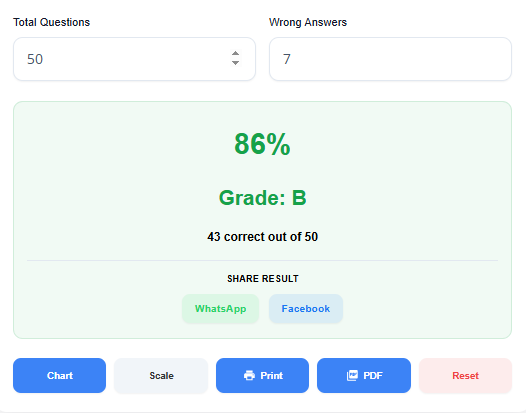
Below that, the full Grading Chart appears — a table showing Wrong, Correct, Score, and Grade for every possible wrong-answer count on your test. This chart is what makes grading a stack of papers fast. You don’t touch the calculator again until the next class.
Step 4: Use the action buttons
The tool gives you five buttons after grading:
- Chart — automatically scrolls to the full grading chart below
- Scale — opens the grading scale editor so you can customize cutoffs
- Print — prints the grading chart for desk reference
- PDF — exports the result as a PDF for your records
- Reset — clears everything to start fresh
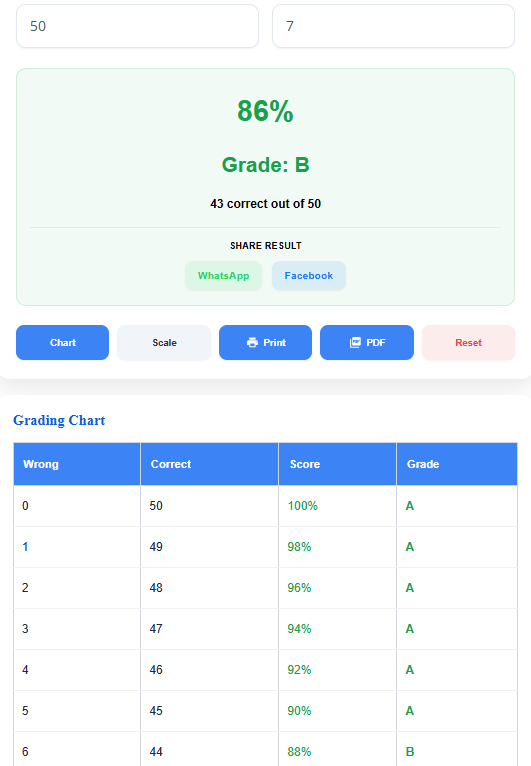
You can also share the score result directly from the result card via WhatsApp or Facebook — useful for quickly sending a grade to a parent or student.
Can Students and Parents Use an Easy Grader Too?
Yes. And it’s more useful to them than most people expect.
Students use it to check their own score before the paper is returned. A student who knows they got 7 wrong on a 50-question test doesn’t have to wait until next class to know they got 86%. They can check it themselves, process the result, and show up ready to move forward. It also helps students understand their grades clearly. When the math is visible — 7 wrong out of 50 equals 86%, which is a B — there is no confusion and nothing to dispute.
Parents benefit from that same transparency. Most grade disputes between parents and teachers come from a parent not understanding how a score was calculated. An easy grader makes the formula visible and verifiable. There’s nothing to dispute when the math is right there.
For parents who want to understand how test scores fit into the bigger grade picture, 5 test score mistakes parents make and how to fix them covers the most common misreads clearly.
Homeschool families use easy graders to replace the need for a grading spreadsheet. Enter the test, get the result, move on. For a parent teaching multiple subjects across multiple children, that simplicity matters.
The Bottom Line
An easy grader is the fastest, most accurate tool for scoring equal-weight tests. Two numbers in. Exact result out. A full grading chart that handles the rest of the stack.
It won’t replace your judgment on essays or rubric-based work. It is designed for objective, equal‑weight assessments such as multiple‑choice, true/false, and spelling tests. It delivers the correct result every time, without calculation errors.
For new teachers especially, that reliability matters. Your first year has enough learning curves. Spending 40 minutes on arithmetic doesn’t have to be one of them.
Try the Easy Grader. It’s free, instant, and requires no signup. For paper-by-paper grading with a custom scale, the Teacher Grader is built for that workflow. And if your grading goes beyond single-test scoring, the Grade Calculator Hub has every tool in one place.
Resources
- RAND Corporation — State of the American Teacher Survey, 2025 URL: https://www.rand.org/pubs/research_reports/RRA1108-12.html Used for: average teacher workweek (49 hours) and grading as a contributor to overtime and burnout.
- Learnosity — Teacher Grading Survey, 2025 URL: https://learnosity.com/resources/the-grading-problem/ Used for: average 9.9 hours per week spent on grading; 95% of teachers taking grading home; 62% citing grading as one of the worst parts of the job.
- National Education Association — The 10-Minute Homework Rule URL: https://www.nea.org/professional-excellence/student-engagement/tools-tips/research-spotlight-homework Used for: grade-level homework time benchmarks (referenced in grading context for proportionality).
- EZ Grader Co. — Product History URL: https://www.ezgrader.com/ Used for: historical context of the physical EZ Grader slide chart (1929 origin).
- U.S. Department of Education — National Center for Education Statistics (NCES) URL: https://nces.ed.gov/ Used for: general context on K–12 grading standards and teacher workload benchmarks in the US education system.
Frequently Asked Questions:
What exactly does an easy grader do?
It converts wrong answers into a percentage and letter grade instantly. Enter how many questions are on the test and how many a student got wrong — the score appears immediately. No math, no formula, no calculator needed.
How is an easy grader different from a regular grade calculator?
An easy grader handles one thing: scoring a single equal-weight test. A grade calculator goes further. It handles weighted categories, course averages, and final exam predictions. Use the easy grader for quick test scoring. Use a grade calculator when your grading involves different assignment weights.
Can I use an easy grader for a 50-question test? What about 15 questions?
Yes. A good digital easy grader works for any number of questions, from 5 to 100 or more. The physical EZ Grader chart had limited ranges. The online version has no such restriction.
What’s the formula an easy grader uses?
Two steps:
Correct answers = Total questions − Wrong answers
Score % = (Correct ÷ Total) × 100
Example: 30 questions, 6 wrong → 24 correct → 24 ÷ 30 × 100 = 80% (Grade: B)
That’s the entire calculation. The tool runs it automatically.
Does an easy grader work for weighted assignments?
No, and this is the most important limitation to understand. An easy grader assumes every question is worth the same amount. If your grading uses categories (homework = 20%, quizzes = 25%, final = 35%), you need a weighted grade calculator, not an easy grader. Using the wrong tool here gives you the wrong result.
Is an easy grader accurate enough for real classroom grading?
Yes, for equal-weight tests. The calculation is mathematically exact, not an estimate. The only scenario where it falls short is weighted or rubric-based assessments. For those, teacher judgment or a weighted grade calculator is required.
Can teachers use an easy grader to grade the whole class at once?
Not in one input. An Easy Grader processes one test score at a time. If you need to grade your entire class simultaneously, the Class Grader is built for that. Enter wrong answers for every student at once and get all scores in a single pass.
Can parents use an easy grader to check their child’s test score?
Yes. Parents can use it the same way teachers do. Enter the total questions and wrong answers to instantly see the percentage and letter grade. It’s especially useful when a child remembers how many they got wrong but the paper hasn’t been returned yet. For a deeper look at how test scores are calculated and reported, understanding what test scores actually mean helps parents interpret results more accurately.
What is a grading chart and why does it matter?
A grading chart shows every possible score for a given test size, all at once. For a 25-question test, it shows the percentage for 0 wrong, 1 wrong, 2 wrong, and so on up to 25 wrong. Once you have the chart, you don’t re-enter anything for the rest of the papers. You just find the wrong-answer count and read the score. It turns a 30-paper grading session into a lookup exercise instead of 30 separate calculations.
Is a digital easy grader better than the physical EZ Grader chart?
For most teachers, yes. The physical chart was limited to specific question ranges and showed only one scale. An online easy grader supports any number of questions, generates a complete grading chart, allows custom grading scales, works on mobile, and lets you print or export results. The concept is the same. The digital version is simply more capable.
How long does grading actually take without a tool like this?
According to a 2025 Learnosity study, the average US teacher spends 9.9 hours per week on grading. That’s more than a full workday — every week. Manual percentage calculations for 30+ papers are a significant part of that time. For strategies to reduce total grading time across all your assessments, how long grading should actually take covers the research and practical fixes.
What is the standard grading scale used in US schools?
Most US K–12 schools use the 10-point scale:
A: 90–100%
B: 80–89%
C: 70–79%
D: 60–69%
F: below 60%
Some schools use a 7-point scale or different cutoffs. A good easy grader lets you customize the scale to match your school’s policy. For a full explanation of what letter grades represent across different systems, what letter grades really mean breaks it down clearly.
Can new teachers use an easy grader on their phone?
Yes. A mobile-friendly easy grader works on any smartphone or tablet without an app download. This matters because many teachers grade during free periods, in the faculty lounge, or between classes, not at a desktop. No WiFi needed for most tools once loaded.
Does the easy grader help students understand their grades?
Yes — more than most people expect. When a student can see that 6 wrong on a 40-question test equals 85%, there’s no mystery. The math is visible. That transparency reduces anxiety, helps students set realistic improvement targets, and eliminates most grade disputes before they start.
Can an easy grader handle partial credit or decimal questions?
Yes, if the tool supports decimal inputs. The EasyGraderHub Easy Grader accepts decimals in the Total Questions field. A test worth 24.5 total points is handled correctly. Not all grading tools support this, so check before you need it.
Are printable grading charts still useful in 2026?
Yes — but only in specific situations. They’re handy in classrooms without reliable Wi‑Fi, for substitute teachers who need a quick reference, or during test‑day when paper records feel more dependable. The Easy Grader generates these charts instantly, so you can create them digitally first and print only when necessary.

Olivia Grant is a former K–12 teacher (12 years) and Lead Content Strategist at EasyGraderHub, holding an M.Ed. in Curriculum & Instruction from the University of Washington. She writes EasyGraderHub’s grading guides and reviews its calculators for classroom accuracy. Read more about Olivia.