Key Takeaways
- Elementary tests are usually short, often 5 to 20 questions, so one wrong answer changes the grade more than it would on a longer test.
- The Easy Grader Calculator turns wrong answers into a percentage and letter grade in one step, for spelling tests, sight word checks, math facts, worksheets, and homework.
- Three habits prevent almost every grading mistake: confirm the total questions first, count blanks as wrong, and check your school’s exact grade scale.
- Parents can use the same tool to translate a returned test percentage into a letter grade in seconds.
- Students can check their own practice quiz scores before the real test counts.
I spent years teaching in elementary classrooms before I started working on grading tools full time. Back then, I graded spelling tests, sight word checks, and math fact quizzes by hand almost every day. A single wrong answer could swing a grade by 10 or 20 points on a short test, and I did not always notice until I double checked my math.
That is the part most grading guides miss. Elementary grading is not just a smaller version of the calculator you would use for a 100-question final exam. It needs its own approach.
This guide covers 7 fast ways the Easy Grader Calculator helps with elementary grading, the right way to use it, the mistakes that trip up even experienced teachers, and how parents and students can use the same tool at home.
Why Elementary Grading Needs Its Own Approach
Elementary tests rarely have 50 or 100 questions. Most spelling tests have 10 to 20 words. Most math fact quizzes have 10 to 20 problems. Sight word and phonics checks often cover 20 to 50 words at a time.
Short tests behave differently than long tests. On a 100-question test, one wrong answer changes the score by 1%. On a 10-question test, one wrong answer changes the score by 10%. That difference matters a lot when you are deciding how to grade a quick weekly quiz.
These are the assessment types where this shows up most in an elementary classroom:
- Spelling tests, usually 10 to 20 words
- Sight word and phonics checks, usually 20 to 50 words
- Math fact quizzes and timed worksheets, usually 10 to 20 problems
- Short reading comprehension checks, usually 5 to 10 questions
- Homework and classwork checks, which are often scored the same way as a quiz
A calculator built for long exams does not make this clear. The Easy Grader Calculator does, because it builds a full grading chart for any test size, including the small ones elementary teachers grade every day.
How Does the Easy Grader Calculator Work for Elementary Test Sizes?
The math behind every grade is simple. Correct answers equal total questions minus wrong answers. Score percent equals correct answers divided by total questions, multiplied by 100.
You can try the Easy Grader Calculator right now. Enter your test size and the number of wrong answers, and the percentage, letter grade, and full chart appear instantly.
Here is what that formula looks like across the test sizes elementary teachers use most.
Grading Chart for Common Elementary Test Sizes
| Test Size | 0 Wrong | 1 Wrong | 2 Wrong | 3 Wrong |
|---|---|---|---|---|
| 5 questions | 100% (A) | 80% (B) | 60% (D) | 40% (F) |
| 10 questions | 100% (A) | 90% (A) | 80% (B) | 70% (C) |
| 15 questions | 100% (A) | 93% (A) | 87% (B) | 80% (B) |
| 20 questions | 100% (A) | 95% (A) | 90% (A) | 85% (B) |
Look at the 5-question row. One wrong answer drops the grade from an A to a B. A second wrong answer drops it all the way to a D. That is a big swing for a single test.
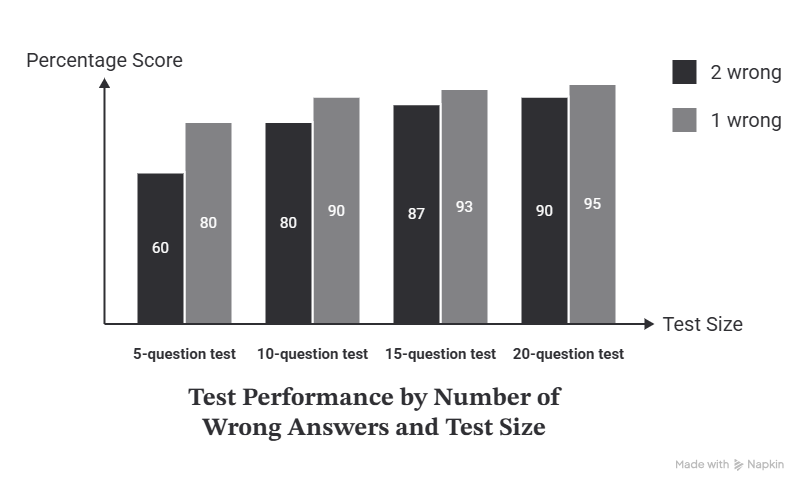
This is exactly why a printed grading chart matters more on short tests than long ones. It is also why I started combining several tiny weekly quizzes into one grade instead of recording each 5-question quiz on its own. A single bad day shouldn’t carry that much weight.
How to Use the Easy Grader Calculator the Right Way
Getting an accurate grade takes three steps, plus one habit that prevents almost every mistake on this list.
- Count the total number of questions on the assignment first, before you grade a single paper. Enter that number into the Total Questions field.
- Count only the wrong answers on each paper, not the correct ones. Enter that number into the Wrong Answers field.
- Read the result. The percentage, letter grade, and correct answer count appear instantly, with no Calculate button to press.
The habit that prevents most errors: confirm the total questions number once, against your answer key, before you start grading a stack. If that number is wrong, every score in the stack will be wrong too, even though the calculator’s math is correct.
If the assignment allows partial credit, like half a point for a labeled diagram, decide that rule before grading the first paper. The calculator accepts decimals, so a score like 8.5 out of 10 still converts correctly once the rule is set.
7 Fast Ways the Easy Grader Calculator Saves Time in Elementary Classrooms
1. Grade Spelling Tests in Seconds, Not Minutes
Spelling tests get graded the same way every single week. Count the wrong words, type in the number, and the calculator shows the percentage and grade right away. For a 10-word test across 25 students, that adds up to real time saved over a school year.
2. Score Sight Word and Phonics Checks Without Mental Math
Sight word checks often cover odd totals, like 23 or 47 words. Those numbers are hard to turn into a clean percentage in your head. Enter the total and the wrong count, and the conversion happens instantly, no mental math required.
3. Convert Math Fact Quizzes and Worksheet Scores Into Grades Instantly
Daily or weekly math fact quizzes and timed worksheets pile up fast. Instead of doing the percentage math five separate times a week, enter the numbers once per assignment and move to the next paper. The chart feature also shows every possible score for that assignment size, which makes scanning a stack of worksheets much faster.
4. Print a Grading Chart for Your Desk Before Test Day
Before handing out a test, see Chart, then Print or PDF. You get a clean reference sheet showing every possible score for that exact test size. Keep it next to your stack of papers so you are never doing the same calculation twice.
5. Handle Partial Credit on Drawing or Short-Answer Questions
Some elementary assignments give partial credit, like half a point for a correctly labeled diagram. The calculator accepts decimal inputs, so a score like 8.5 out of 10 still converts to the right percentage and grade.
After grading, use the Share Result button to send a score by WhatsApp, Facebook, or another app. This helps when a paraprofessional grades part of a stack and needs to report results back to the lead teacher quickly.
7. Let Students Check Their Own Practice Quiz Scores
Students do not have to wait for a teacher to find out how a practice quiz went. They can count their own wrong answers and enter the numbers to see an instant percentage and letter grade. This works well before a real test, when a student wants to know if they are ready or need another review session, and it helps students connect their own effort to their results instead of just waiting for a number to be handed back.
Common Elementary Grading Mistakes and Why a Calculator Avoids Them
I made every one of these mistakes myself before I switched from a notepad and pen to a grading calculator.
Entering the wrong test total. If a worksheet has 18 questions and you type in 20 by mistake, every result in that stack will be wrong before it ever reaches the gradebook. Count the total once, check it against the answer key, and confirm it before you start.
Counting blank answers as correct. A question a student skipped is still a wrong answer for scoring purposes in almost every classroom. Forgetting this rule is one of the easiest ways to inflate a score by accident.
Mixing up percentage and letter grade. An 83% and a B are related, but they are not interchangeable in every grading policy. Some schools use plus and minus grades, like B+ for 87 to 89%, so check your school’s exact scale before recording the letter.
Doing the math by hand on a tired Friday afternoon. Manual grading is not wrong, it is just slow, and it gets less accurate the more papers are left in the stack. A grading calculator removes that risk entirely, since the formula runs the same way on paper one as it does on paper thirty.
That last point is really the whole argument for using a calculator instead of manual math on elementary assignments. The math itself, correct answers divided by total questions, is not hard. What is hard is doing it correctly forty times in a row without a single typo or rounding slip. A calculator does not get tired, does not skip a decimal, and gives the exact same result on the last paper as it did on the first one.
How Can Parents Use the Easy Grader Calculator
Many parents look at a percentage on a returned test and aren’t sure what it actually means. A 75% looks far below a 95%, but the letter grades might only be one step apart, a C versus an A.
Enter the same total questions and wrong answers from your child’s paper into the Easy Grader Calculator. The result shows the percentage, the letter grade, and exactly where that score sits on the standard scale. A confusing number turns into a clear answer in a few seconds.
If you also need to check a full semester grade instead of a single test, browse the grading tools hub for a calculator built for weighted averages.
Frequently Asked Questions About Grading Elementary Tests
What grading scale works best for elementary report cards?
Most U.S. elementary schools use the same 10-point scale as middle and high school: 90 to 100 is an A, 80 to 89 is a B, 70 to 79 is a C, 60 to 69 is a D, and below 60 is an F. Some schools use a standards-based scale instead, with marks like “meets” or “approaching” rather than letter grades. Check your school’s specific policy, since the calculator’s percentage still applies either way.
How many questions should a typical elementary spelling test have?
Most elementary spelling tests have 10 to 20 words, depending on grade level. Kindergarten and first grade often use 5 to 10 words, while third through fifth grade often use 15 to 20. A shorter test means each wrong word has a bigger effect on the final grade, which is exactly why a printed grading chart helps confirm the score fast.
Can the Easy Grader Calculator be used for worksheets and homework, not just tests?
Yes. The same formula works for any assignment with a clear number of questions and a clear number of wrong answers, including worksheets, homework checks, and classwork reviews. The only assignments it cannot grade are open-ended writing, projects, or rubric-based work, since those need a teacher’s judgment instead of a simple right-or-wrong count.
Conclusion
Elementary grading happens constantly, in small batches, on short assignments where a single mistake changes the grade more than it would on a longer exam. That is the problem a calculator built for a 100-question final cannot solve on its own, and it is the gap this guide set out to close.
The Easy Grader Calculator turns spelling tests, sight word checks, math fact quizzes, and short worksheets into an instant percentage and letter grade, with a printable chart for the assignments you grade every week. Parents get the same clarity on a returned test, and students can check their own practice quizzes before the real one counts.
The math has not changed since the first EZ Grader slide chart sold in a teacher supply store decades ago. What has changed is how fast you can get the answer, and how much classroom time that gives back to actual teaching.
__________________________________________________________________________________________________
Sources
- Great Schools Partnership, Research Supporting Standards-Based Grading and Reporting
- AASA, A Case for Standards-Based Grading and Reporting
- Seesaw, The 4 Types of Assessments Every K–5 Teacher Should Know
- Fairfax County Public Schools, Elementary School Grading and Reporting

Olivia Grant is a former K–12 teacher (12 years) and Lead Content Strategist at EasyGraderHub, holding an M.Ed. in Curriculum & Instruction from the University of Washington. She writes EasyGraderHub’s grading guides and reviews its calculators for classroom accuracy. Read more about Olivia.