
Grading 30 papers one by one takes 75 to 90 minutes. Most of that time is arithmetic and data entry, not professional judgment.
Teachers already know this. A nationally representative EdWeek survey found that K-12 teachers spend a median of 5 hours per week on grading and feedback, the same amount they spend on lesson planning. The difference is that lesson planning improves what happens in class next week. Manual grade calculation does not.
This article covers exactly how the Class Grader solves that problem. You will learn:
- Where manual class grading actually loses time (it is not where most teachers think)
- The 4-step batch workflow that cuts a 90-minute stack to under 20 minutes
- Which assignment types work with batch grading and which still need teacher review
- The four mistakes that slow even experienced teachers down
- How to stay accurate at speed, and how to verify any disputed grade in seconds
The Class Grader is a free bulk grading calculator. You enter total questions once, paste your student list, and every student’s percentage, letter grade, GPA, and pass/fail status appear in one click. No repeated math. No separate gradebook entry.
Key Takeaways:
- Teachers spend an average of 11 hours per week grading, and 95% bring that work home (Teacher Workload Research Report, 2024).
- Batch grading processes every student’s score in one operation. One paper at a time does not scale.
- The Class Grader calculates scores, letter grades, and GPA for your entire class in one click. No repeated math. No manual entry.
- A class of 30 papers on a 25-question test takes under 20 minutes with the batch workflow, versus 75 to 90 minutes manually.
- For single-paper grading with workflow features, use the Teacher Grader.
Why Do Teachers Still Spend Hours Grading One Paper at a Time?
According to the Teacher Workload Research Report, 2024, the average K-12 teacher spends 11 hours per week grading, and 95% take that work home. A 2022 analysis found that grading consumes the same share of time as lesson planning, crowding out the work that actually improves student outcomes.
The problem is not how many papers are in the stack. It is the workflow. Most teachers run the same five-step sequence once per paper: mark errors, count them, calculate the percentage, look up the letter grade, record the score. For 30 students, that is 30 repetitions of steps that add no professional value.
Batch grading eliminates repetitive calculations. Instead of scoring each paper one at a time, teachers tally wrong answers across the stack, then run a single operation that scores every student simultaneously.
The efficiency gains are significant. In fact, grading calculators save teachers time in batch processing, with results varying by class size and assignment type. The numbers make clear why this method is becoming a standard for teachers who want speed without sacrificing accuracy.
Where Do Teachers Actually Lose Time During Class Grading?
Three specific steps in the manual workflow consume the most time and cause the most errors.
Manual math per paper. Dividing correct answers by total questions, multiplying by 100, confirming the result: roughly 25 seconds per paper. For 30 students, that is 12 minutes of pure arithmetic that produces no instructional insight.
Scale lookup per paper. Confirming whether 84% is a B or a B-plus takes 5 to 10 seconds per paper. Across 30 papers, that is another 4 minutes spent consulting a chart that should only be read once.
Separate score recording. Writing the score on the paper and then re-entering it into a gradebook or spreadsheet doubles the data entry work. This step is where transcription errors enter, and where teachers spend time correcting mistakes that never needed to happen.
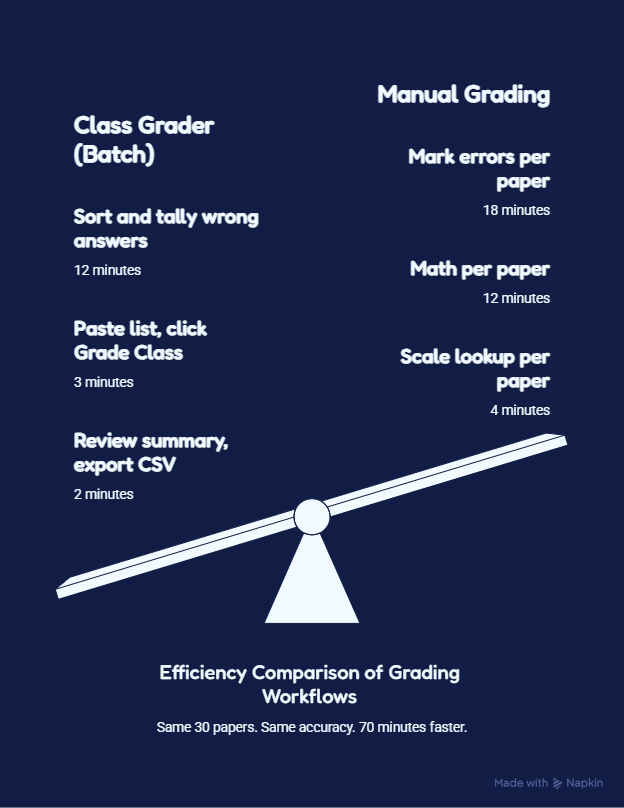
A batch grader removes all three steps from the per-paper workflow. The math runs once, for every student, simultaneously.
How Does the Class Grader Work?
The Class Grader replaces all three problem steps with one operation.
Step 1: Enter the total number of questions on the test. Step 2: Select your grading scale (Standard 10-point, Plus/Minus, or Pass/Fail). Step 3: Paste your student list in the format Name: Wrong Answers, one student per line. Step 4: Click Grade Class.
Every student’s percentage, letter grade, GPA, and pass/fail status appear instantly in a single results table. The class average, pass rate, top score, and lowest score display automatically above the table. You did not calculate any of it.
Click Download CSV and the full results file imports directly into Canvas, Blackboard, PowerSchool, and Google Sheets without reformatting. This kind of process can help teachers grade an entire class more efficiently.
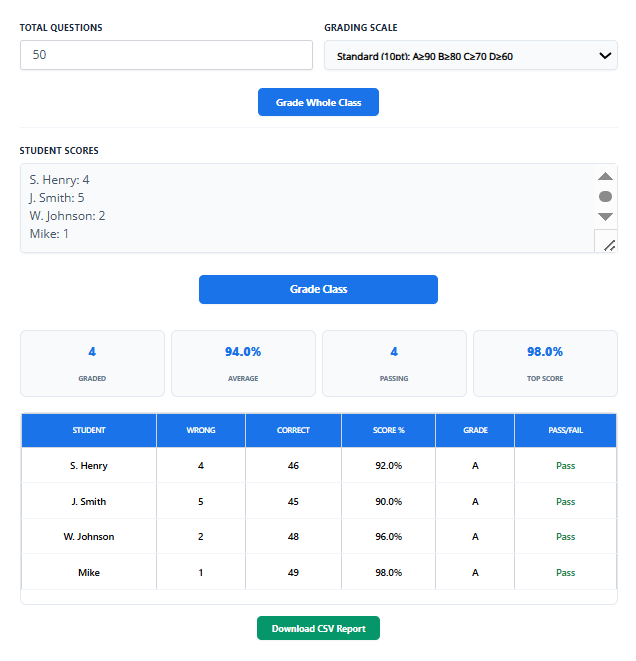
What the results look like for 30 students on a 25-question test:
| Summary Stat | Result |
|---|---|
| Class average | 81% (B) |
| Students passing | 26 out of 30 (87%) |
| Top score | 96% |
| Lowest score | 52% |
What Assignments Work With the Class Grader?
The Class Grader is built for any objective assessment scored by right and wrong answers:
- Multiple-choice quizzes and unit tests
- True/false and matching assessments
- Spelling tests and vocabulary quizzes
- Math drills and fill-in-the-blank worksheets
It does not replace teacher judgment for essays, projects, or rubric-based work. For mixed-format tests, grade the objective section with the Class Grader first, then handle the written section separately with a rubric.
Class Grader vs Teacher Grader: Which Tool Do You Need?
| Feature | Class Grader | Teacher Grader |
|---|---|---|
| Best for | Entire class at once | One paper at a time |
| Input | Paste full class list | Enter one score |
| Output | All students, one click | One student result |
| Export | CSV for gradebook import | Single result |
| Use when | Stack of 20 to 100 papers | Individual or late paper |
Most teachers use both. Class Grader at the end of a test day for the full stack. Teacher Grader during class for individual checks or papers submitted late.
What Is the Fastest Workflow for Grading an Entire Class?
Step 1: Sort Papers Before You Start
Separate papers by class period before opening any tool. If multiple sections took the same test, decide now whether to run them as one batch or separately. Two minutes of sorting prevents re-handling the stack later.
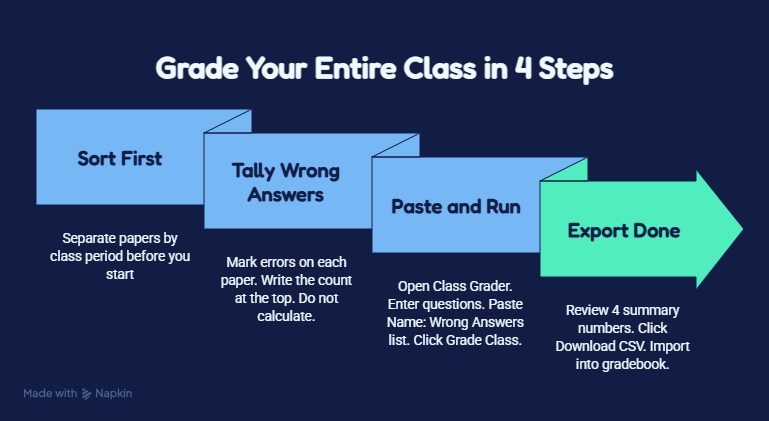
Step 2: Tally Wrong Answers Across the Whole Stack
Go through each paper, mark wrong answers, and write the count at the top of the paper. This is the only step done paper by paper, and it is purely physical. Do not calculate percentages. Do not look up letter grades. Just mark and count.
For 30 papers on a 25-question quiz, this step takes about 12 minutes.
Step 3: Enter All Scores in One Operation
Open the Class Grader, enter your question count, select your grading scale, paste the full student list, and click Grade Class. All scores, grades, and GPA values appear in under 10 seconds.
Step 4: Review, Then Export
Before exporting, scan the four summary numbers: class average, pass rate, top score, lowest score. If the class average looks wrong, the most common cause is an incorrect total question count, not a calculation error. Correct the count and re-run. Once the results look accurate, click Download CSV.
Full workflow time for 30 papers on a 25-question test:
| Step | Time |
|---|---|
| Sort papers by period | 2 min |
| Tally wrong answers across stack | 12 min |
| Enter into Class Grader and run | 3 min |
| Review summary results | 2 min |
| Export CSV | 30 sec |
| Total | Under 20 minutes |
The same stack takes 75 to 90 minutes with manual math and separate gradebook entry.
What Mistakes Slow Teachers Down the Most?
Calculating while marking. Counting wrong answers and running percentage math at the same time splits your attention. Tally the full stack first. Calculate with the tool second. These are two separate tasks.
Mixing feedback with scoring. Writing comments while recording scores turns a 15-minute objective session into a 45-minute combined session. Score all papers first. Export all grades. Return to individual papers for written feedback only where it is genuinely needed.
Not confirming the grading scale before starting. Grading 30 students on the Standard 10-point scale and discovering the school uses Plus/Minus means re-running the entire batch. Five seconds before you start prevents five minutes of rework.
Recalculating by hand when a grade is questioned. If a parent or student disputes a score, do not do the math again on paper. Enter the student’s wrong answer count into the Class Grader and read the result. It takes five seconds and removes any room for a second human error.
Batch processing doesn’t always fit every classroom. In smaller groups, individual grading can feel more precise, while larger classes often benefit from the speed of bulk grading. The choice depends on class size, grading style, and how much feedback you want to provide.
When comparing individual grading with bulk methods, the differences go beyond efficiency. Bulk grading reduces repetitive work and minimizes calculation errors, while individual grading allows for more personalized comments and nuanced scoring. Knowing when to use each approach helps teachers save time without losing accuracy.
How Do Teachers Stay Accurate While Grading Fast?
Speed creates errors only when the workflow skips verification steps. The Class Grader builds two of them in automatically.
Lock your settings before entering the first student. Set the total question count and grading scale once. Do not change either mid-batch. Changing either setting partway through creates inconsistency across the class.
Use the summary bar as your accuracy check. The class average, pass rate, top score, and lowest score appear above the results table automatically. If any of these four numbers looks wrong for this particular class and this particular test, the most likely cause is a wrong question count. Fix it before exporting.
Save every CSV as your session record. The exported file is a permanent record of what the tool calculated. If a grade is disputed two weeks later, the CSV is your documentation. Organize saved files by test date and class period.
Why Does Grading Differ by Subject?
The Class Grader handles any test scored by right and wrong answers. However, the tallying step before you use the tool differs by assignment type.
Short quizzes and multiple-choice tests move fastest. Wrong answers are clean, countable, and unambiguous. The full workflow runs in under 20 minutes for a class of 30.
Math problem sets with partial credit still work. The Class Grader accepts decimal totals, so a test worth 22.5 points calculates correctly. Enter the decimal in the question count field. Student wrong answer counts remain whole numbers.
Mixed-format tests (objective plus short-answer) require two passes. Grade the objective section with the Class Grader. Grade the written section separately with a rubric. Combine both scores in your gradebook afterward.
Essays and creative work are not a fit for any batch calculator. These require rubric-based review with individual teacher judgment. For those workflows, the Teacher Grader supports one-paper-at-a-time scoring with more control.
Conclusion
I have graded stacks of 35 papers at 9 p.m. with a red pen and a calculator, running the same division problem 35 times. I know exactly what that costs, and it is not just time. It is the energy that should have gone into planning tomorrow’s lesson, not checking whether 19 divided by 25 equals 76%.
Batch grading changes that calculation entirely. You still do the professional work: you mark the errors, you notice the patterns, you decide what to reteach. What you stop doing is the arithmetic. That part should never have been yours to begin with.
The Class Grader runs all the math in one click. The workflow takes four steps: sort, tally, paste, export. A stack that used to take 90 minutes takes under 20.
If you are grading one paper at a time or processing late submissions, the Teacher Grader is built for that. If you want to compare every grading tool available and see which ones actually save time, the Grade Calculator Hub is the right starting point. Your time belongs in the classroom. Use the tool that puts it back there.
Resources
- ResearchGate record: https://www.researchgate.net/publication/381298658_Teacher_Workload_Research_2024_Main_Report
- UWS Academic Portal:
- https://research-portal.uws.ac.uk/en/publications/teacher-workload-research-report-2024/
- Companion article:
- https://www.edweek.org/teaching-learning/heres-how-many-hours-a-week-teachers-work/2022/04
- RAND primary source: https://www.rand.org/content/dam/rand/pubs/research_reports/RRA1100/RRA1108-12/RAND_RRA1108-12.pdf
- Grading vs Planning Time:
- https://www.edutopia.org/article/why-teachers-should-grade-less-frequently
- Pew Research on Teacher Time:
- : https://www.pewresearch.org/social-trends/2024/04/04/how-teachers-manage-their-workload/
FAQs:
What is a class grader?
A class grader is a bulk grading calculator that computes percentage scores, letter grades, and GPA for your entire class in one click. You enter total questions once, paste your student list, and all results appear instantly. It is built for batch grading, not one-at-a-time scoring.
How do I use the Class Grader?
Enter total questions, select your grading scale, paste your student list in the format Name: Wrong Answers (one per line), and click Grade Class. Every student’s percentage, letter grade, GPA, and pass/fail status appear immediately. Download the CSV to import into your gradebook.
How many students can the Class Grader handle at once?
Up to 100 students per batch. For multiple class sections, run each section separately and download a CSV for each. The file includes all student names, scores, grades, and the class average.
What types of tests work with the Class Grader?
Any objective test scored by right and wrong answers: multiple-choice, true/false, spelling tests, math drills, vocabulary quizzes, and fill-in-the-blank worksheets. It is not designed for essays or rubric-based assignments.
What is the difference between the Class Grader and the Teacher Grader?
What is the difference between the Class Grader and the Teacher Grader? The Class Grader processes your entire class roster in one operation. The Teacher Grader grades one paper at a time with the +1 Wrong method and Next Paper Mode. Use the Class Grader for a full stack. Use the Teacher Grader for individual papers.
Does the Class Grader support partial credit?
Yes. Enter a decimal in the total questions field (for example, 22.5) and the tool calculates correctly. Student wrong answer counts remain whole numbers.
What grading scales does the Class Grader support?
Three scales: Standard 10-point (A=90-100%), Plus/Minus (A+ to F), and Pass/Fail. Select the scale before entering student data. It applies to every student in the batch automatically.
Is the Class Grader free?
Yes. No account, no signup, no download. Open the tool, enter your data, grade your class, export the CSV. Everything is free and available immediately.

Olivia Grant is a former K–12 teacher (12 years) and Lead Content Strategist at EasyGraderHub, holding an M.Ed. in Curriculum & Instruction from the University of Washington. She writes EasyGraderHub’s grading guides and reviews its calculators for classroom accuracy. Read more about Olivia.