
A weighted grade multiplies your average score in each category by that category’s percentage weight, then adds the results together. If homework is worth 20 percent of your grade and you’re averaging 90 percent there, homework contributes 18 points toward your final grade, not 90. That single rule is the entire foundation of weighted grading. Everything else in this guide is what happens when a real syllabus complicates it: categories that haven’t been graded yet, weights that don’t add up to 100 percent, points instead of percentages, and extra credit that doesn’t fit cleanly into either.
The Weighted Grade Calculator runs every calculation in this guide instantly once you enter your syllabus’s categories and scores. But knowing the math yourself means catching an error before it becomes a bad grade, and working out exactly what you need on a final exam without guessing.
What Is a Weighted Grade?
Grade weighting assigns different levels of importance to different parts of a course grade, instead of averaging every assignment equally. A final exam worth 40 percent moves your grade four times more than a quiz worth 10 percent, even with an identical score on both. That’s the entire point: the final grade reflects what the course actually values, not just how many assignments happened to land in each category.
Weighting shows up at two levels. Category weighting assigns percentages to groups like exams, homework, and papers, and this is what most syllabi mean by “weighted grades.” Points-based weighting assigns raw point values instead, and lets the weights emerge from those numbers. Both follow the same underlying math; the difference is whether the weight is stated directly or has to be calculated from point totals.
Before calculating anything, you need the exact weights from the syllabus. A syllabus grading breakdown is usually required documentation, not an informal note — many colleges and universities have official policies requiring instructors to disclose category weights in writing, which is one reason the numbers on your syllabus should match what shows up in your course portal.
The Weighted Grade Formula
Weighted Grade = (Category 1 Score × Weight 1) + (Category 2 Score × Weight 2) + … ÷ Total Weight
When every category has a grade and the weights total exactly 100 percent, dividing by total weight simplifies to dividing by 100, which is why most examples skip that step entirely. The full version matters later in this guide, once a category is still empty or the weights don’t add up cleanly.
Step 1: Get Your Category Weights From the Syllabus
Example breakdown:
| Category | Weight |
|---|---|
| Participation | 10% |
| Homework | 20% |
| Quizzes | 20% |
| Midterm | 20% |
| Final Exam | 30% |
Add the weights up first. They should total 100 percent. If they don’t, the section below on proportional scaling covers exactly what that means.
Step 2: Average Every Score Inside Each Category
Before a category can be weighted, it needs one number that represents it: the average of every assignment inside it.
Example: A student scores 88%, 92%, 82%, and 99% across four quizzes.
88 + 92 + 82 + 99 = 361
361 ÷ 4 = 90.25%
That 90.25 percent is what gets weighted in Step 3, not any single quiz score.
Step 3: Multiply Each Category Average by Its Weight
Convert each weight to a decimal, then multiply it by that category’s average.
| Category | Average Score | Weight | Contribution |
|---|---|---|---|
| Participation | 95% | 0.10 | 95 × 0.10 = 9.50 |
| Homework | 89% | 0.20 | 89 × 0.20 = 17.80 |
| Quizzes | 90.25% | 0.20 | 90.25 × 0.20 = 18.05 |
| Midterm | 84% | 0.20 | 84 × 0.20 = 16.80 |
| Final Exam | 91% | 0.30 | 91 × 0.30 = 27.30 |
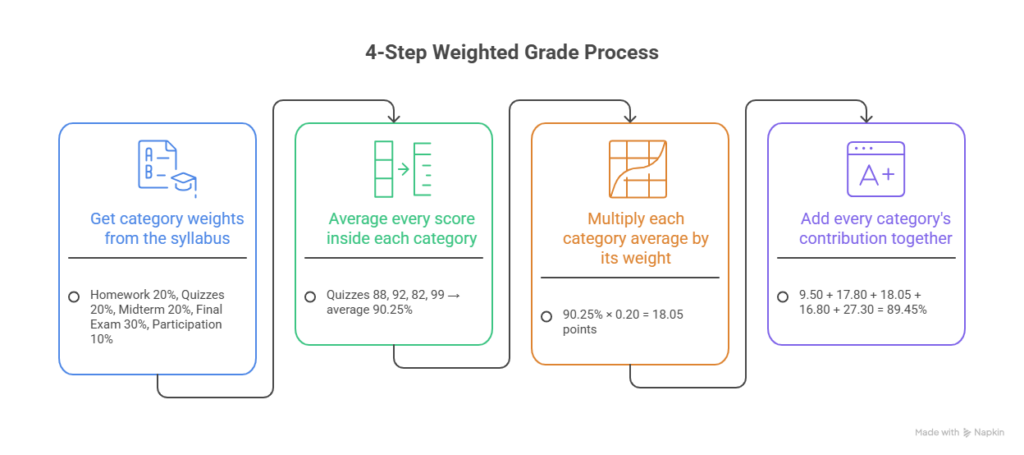
Step 4: Add the Contributions Together
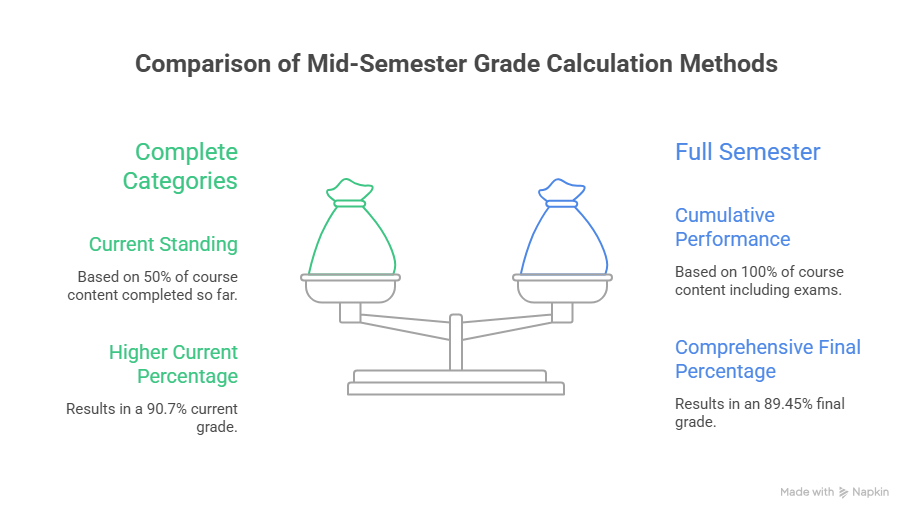
9.50 + 17.80 + 18.05 + 16.80 + 27.30 = 89.45%
The final exam alone contributed more than participation and homework combined, even though it wasn’t the highest individual score in the table. That’s weighting doing what it’s designed to do.
Turning a Percentage Into a Letter Grade
An 89.45 percent lands as a B+ on plus/minus scales like the one below, but not every school uses plus and minus grades, and the exact cutoffs vary. Confirm the scale in your syllabus before assuming a specific letter.
| Percentage | Common Letter |
|---|---|
| 97–100% | A+ |
| 93–96% | A |
| 90–92% | A- |
| 87–89% | B+ |
| 83–86% | B |
| 80–82% | B- |
| 70–79% | C range |
| 60–69% | D range |
| Below 60% | F |
A Second Worked Example: Three-Category Course
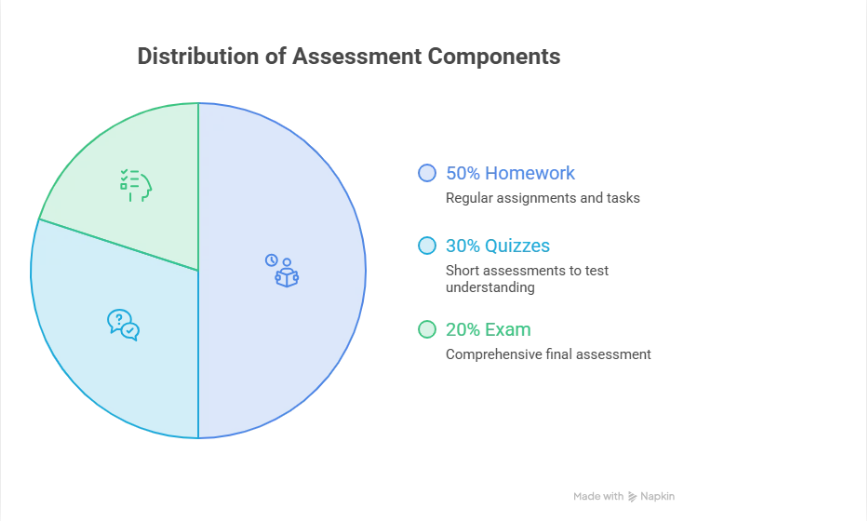
The formula works identically whether a syllabus has five categories or three. Here’s a common structure: Homework 50%, Midterm 20%, Final Exam 30%.
| Category | Average Score | Weight | Contribution |
|---|---|---|---|
| Homework | 87% | 0.50 | 87 × 0.50 = 43.50 |
| Midterm | 74% | 0.20 | 74 × 0.20 = 14.80 |
| Final Exam | 91% | 0.30 | 91 × 0.30 = 27.30 |
| Final Grade | 85.60% |
Notice how much homework’s 50 percent weight carries here compared to the midterm’s single 74 percent score. A student who assumes a 74 on a midterm is dragging their grade down is usually wrong, since a heavily-weighted homework average with strong consistency will offset one weaker exam every time.
Percentage-Based vs. Points-Based Weighting
Not every syllabus states weights as explicit percentages. Many course portals assign each assignment a point value instead, and the weight is whatever percentage that point value represents of the total points possible. This is points-based weighting, and it produces weights just as real as percentage-based ones, they’re just harder to see.
Example:
| Assignment | Points Possible | Points Earned |
|---|---|---|
| Homework | 50 | 50 |
| Midterm | 100 | 78 |
| Final Exam | 150 | 138 |
| Total | 300 | 266 |
Final Grade: 266 ÷ 300 = 88.67%
The implicit weights emerge from the point allocation: the Final Exam is worth 150 ÷ 300 = 50 percent of the grade, the Midterm is worth 100 ÷ 300 ≈ 33.3 percent, and Homework is worth only 50 ÷ 300 ≈ 16.7 percent. Nobody wrote “the final is 50 percent” anywhere, but that’s exactly what the point values mean.
Why this matters mid-semester: if a teacher adds a new 200-point project partway through the term, the total points possible jumps to 500, and that single project now represents 200 ÷ 500 = 40 percent of the entire grade. Every other assignment’s effective weight shrinks at the same time, even though nothing about those assignments changed. If your course portal shows points instead of percentages, always check the running point total before assuming your category weights are fixed.
What If the Weights Don’t Add Up to 100%?
This can happen from a typo, or from a policy like “lowest quiz score dropped” that changes the effective weight without the syllabus spelling out new numbers.
If the weights genuinely don’t total 100 percent, scale each one proportionally: divide each individual weight by the sum of all the weights, then use those adjusted numbers in Step 3. If your listed weights only add up to 95 percent, divide each weight by 0.95 to bring the total back to 100 before calculating.
What If a Category Doesn’t Have a Grade Yet?
This is the situation many students are actually in when they search this topic. Mid-semester, a final exam category might carry 30 percent on the syllabus, but there’s no final exam score yet. Dividing by 100 anyway makes the current grade look artificially low.
The fix: use only the weights for categories that currently have grades, and divide by the sum of those weights instead of 100.
Example: Only Participation (10%), Homework (20%), and Quizzes (20%) have grades so far, a combined 50 percent of the course.
(9.50 + 17.80 + 18.05) ÷ 0.50 = 45.35 ÷ 0.50 = 90.7%
That 90.7 percent is the accurate current grade based on completed work, not the final grade, but a true read on where things stand right now.
If more than one category is missing, the same rule applies, you just exclude more weight. If Midterm (20%) and Final Exam (30%) are both still ungraded, only 50 percent of the course is on the books, and that’s still the number you divide by, regardless of how many categories make up the other 50 percent.
Working Backward: What Score Do You Need on What’s Left?
Once the current grade and the weight of what’s remaining are known, it’s possible to solve for exactly what score is needed to hit a target.
Using the example above: the student is at 90.7 percent with only the Midterm (20%) and Final Exam (30%) remaining. If she wants a 90 percent overall, and the midterm is already in at 84 percent (contributing 84 × 0.20 = 16.80), she can solve for the required final exam score:
90 = 45.35 + 16.80 + (Final Exam Score × 0.30)
90 = 62.15 + (Final Exam Score × 0.30)
Final Exam Score = (90 − 62.15) ÷ 0.30 = 92.8%
Drop-Lowest Policies and Weighted Grades
Drop-Lowest Policies and Weighted Grades
Some syllabi drop the lowest score in a category before averaging. This changes the category average that gets weighted in Step 3, so it needs to happen before you calculate anything else.
Example: Five quiz scores, lowest one dropped.
| Quiz | Score |
|---|---|
| Quiz 1 | 82 |
| Quiz 2 | 91 |
| Quiz 3 | 76 |
| Quiz 4 | 88 |
| Quiz 5 | 64 (dropped) |
Without drop: (82+91+76+88+64) ÷ 5 = 80.2%
With drop-lowest: (82+91+76+88) ÷ 4 = 84.25%
That category average, not the un-dropped one, is what gets multiplied by the category’s weight in Step 3.
Two things to watch for: if quizzes have unequal point values, “the lowest score” can mean lowest by raw points or lowest by percentage, and those aren’t always the same assignment. Most gradebooks drop by percentage, but confirm it with your syllabus or teacher if the numbers look off. And if an assignment is missing entirely, check whether the syllabus’s drop policy applies only to completed work. Some students skip an assignment assuming it will be the one dropped, which isn’t always how the policy is written.
Without drop: (82+91+76+88+64) ÷ 5 = 80.2%
With drop-lowest: (82+91+76+88) ÷ 4 = 84.25%
That category average, not the un-dropped one, is what gets multiplied by the category’s weight in Step 3.
Two things to watch for: if quizzes have unequal point values, “the lowest score” can mean lowest by raw points or lowest by percentage, and those aren’t always the same assignment. Many gradebooks drop by percentage, but this isn’t universal, so confirm which your teacher’s policy uses if the numbers look off. And if an assignment is missing entirely, check whether the drop policy applies only to completed work. Some students skip an assignment assuming it will be the one dropped, which isn’t always how the policy is written.
Missing Assignments: Zero vs. Excluded
A zero for a missing assignment has an outsized effect on a weighted grade, more than most students expect. If a 20-percent-weighted category gets a zero average, that single category caps the maximum possible final grade at 80 percent, even with perfect scores everywhere else.
Example: the five-category student from Step 3, but the Quizzes category (20% weight) is recorded as a zero instead of excluded.
9.50 + 17.80 + 0 + 16.80 + 27.30 = 71.40%
Compare that to the 89.45 percent calculated earlier with an actual quiz average in place. The eighteen-point gap is entirely the zero, not any real drop in performance. This is exactly why the “category doesn’t have a grade yet” section above matters: an ungraded category should be excluded from the calculation, not scored as a zero, unless a teacher has explicitly stated that missing work receives a zero as a grading policy rather than a placeholder.
Extra Credit in a Weighted System
Extra credit doesn’t get its own weight in most systems. How it’s applied changes the outcome, so it’s worth knowing which method your course uses.
| Method | How It Works | Effect |
|---|---|---|
| Added inside a category | Bonus points added to the numerator before averaging that category | Boosts one category’s average; weight stays the same |
| New small category | Extra credit becomes its own category with a small weight | Adds points on top of 100%; requires the syllabus to define the weight |
| Replaces a low score | Extra credit substitutes for the weakest score in a category | Functions like a partial |
Example (most common method): a Homework category with scores of 80%, 85%, and 90%, plus 3 bonus points earned on one assignment.
(80 + 85 + 93) ÷ 3 = 258 ÷ 3 = 86.0%, instead of the 85.0% average without the bonus.
The 3 points get added before the category is averaged, not tacked onto the final weighted total at the end. Adding extra credit after the weighted calculation instead of before it is one of the more common ways students accidentally miscalculate their own grade.
If your syllabus caps category scores at 100%, apply that cap after adding the bonus and before weighting. A homework category already averaging 99% with 5 bonus points doesn’t become 104% in the weighted total, it gets capped at 100% first, since most policies that allow extra credit still don’t allow a category to count for more than it’s worth.
Rounding at Grade Boundaries
An 89.5 percent that rounds to 90 can mean the difference between a B+ and an A-. Two rounding mistakes cause most of the confusion between a hand calculation and a course portal: rounding each category’s contribution individually instead of only the final total, and assuming a school rounds at 0.5 when it actually truncates or rounds only at specific published boundaries. Check the syllabus’s grading policy section for the exact rule before assuming either one.
A Pattern I Saw Often as a Teacher
A common pattern from my years in the classroom: a student brings home a 78 percent on a quiz, and it looks alarming next to a semester grade. But if quizzes are only worth 15 percent of the total while a single project carries 35 percent, that one quiz barely moves the final number.
The real risk in those situations usually wasn’t the quizzes. It was a heavily-weighted category the student had been treating as minor. Once the categories were weighted correctly, the study priorities usually changed. The math itself isn’t the hard part. Knowing which category actually deserves the attention is.
Common Mistakes to Avoid
Using individual scores instead of category averages. Every score inside a category needs averaging first. Weighting one quiz score instead of the category average produces the wrong number.
Dividing by 100 before every category has a grade. This is the most common error, and it always makes a mid-semester grade look lower than it is. Divide by the total weight of completed categories only.
Treating a missing assignment as a zero instead of excluding it. As shown above, this can cost nearly twenty points on a current grade that isn’t actually final yet.
Adding extra credit after the weighted total instead of inside a category. Extra credit almost always belongs in the numerator of a category average, not tacked onto the final percentage.
Rounding too early. Round the final result, not each category’s contribution along the way.
Confusing course-grade weighting with GPA weighting. These solve two different problems, covered next.
Weighted Course Grade vs. Weighted GPA
Both use the word “weighted,” and that’s where the similarity ends.
Weighted Course Grade vs. Weighted GPA
Both use the word “weighted,” and that’s where the similarity ends.
| Weighted Course Grade | Weighted GPA | |
|---|---|---|
| What it measures | Performance within one class | Performance across an entire transcript |
| What “weighted” means | Category percentages inside that course | Extra grade points for honors, AP, or IB-level courses |
| Where it’s calculated | Category score × category weight, per class | Course grade points, adjusted for course level, averaged across all classes |
| Common confusion point | Mistaken for GPA weighting | Mistaken for course-level category weighting |
A weighted course grade is everything covered above: category percentages inside one class. A weighted GPA is a separate, school-level calculation that gives extra grade-point value to honors, AP, or IB courses across a full transcript, and it doesn’t touch the category math at all.
A Worked Example: Weighted GPA
Say a student takes five classes in a semester: three regular courses and two AP courses. Many schools add one extra grade point to AP or honors courses on a weighted scale, so an A in a regular class is worth 4.0, but an A in an AP class is worth 5.0. Exact bonus amounts vary by school, some use 0.5 instead of 1.0, so check your school’s policy before assuming this one.
| ourse | Type | Grade | Weighted Points |
|---|---|---|---|
| English | Regular | A | 4.0 |
| History | Regular | B | 3.0 |
| Algebra II | Regular | B | 3.0 |
| AP Biology | AP | A | 5.0 |
| AP US History | AP | B | 4.0 |
Add the points and divide by the number of classes:
4.0 + 3.0 + 3.0 + 5.0 + 4.0 = 19.0
19.0 ÷ 5 = 3.80 weighted GPA
Notice that the course-grade weighting from earlier in this guide never enters this calculation. The 89.45 percent worked out in Step 4 would still need to convert to a single letter grade first, and only that letter (not the percentage, and not the category weights) feeds into the GPA formula above.
What the Weighted Grade Calculator Adds
Running this by hand works for a quick check. It gets tedious fast across five categories over a full semester. The Weighted Grade Calculator covers every step above automatically:
- Category-by-category entry. Add each syllabus category, homework, quizzes, midterm, final exam, or whatever the course uses, with its own weight and score.
- One result screen. Current weighted percentage, letter grade, GPA estimate, and pass/fail status all appear together, without a separate lookup table.
- A built-in Final Exam Predictor. Enter a target grade and the final exam’s weight, and it calculates the exact score needed, the same algebra from the “working backward” section above, done instantly.
- Handles any category structure, whether your course portal displays weights as percentages or as points, so the same numbers from your syllabus can be entered directly.
If your gradebook mixes weighted categories with extra credit or a drop-lowest policy, the Extra Credit Calculator handles that piece separately, since bonus points usually need to be applied before, not after, the weighting step covered in this guide.
Final Words:
The weighted grade formula itself is one line of math. What actually trips people up is applying it mid-semester, when categories are incomplete, points and percentages are mixed, and the weights on paper don’t match what currently applies. Get the completed-categories math right, know how points-based grading hides its weights, and it’s clear where things stand and what’s needed on what’s left. Run it by hand to understand every step, or use the Weighted Grade Calculator for the answer and the target-score projection in one step.
Resources
- University of Saskatchewan, Academic Courses Policy on Class Delivery, Examinations, and Assessment of Student Learning, confirms assessment weighting must be specified on the syllabus as official university policy. https://policies.usask.ca/policies/academic-affairs/academic-courses.php
- Georgetown University CNDLS, Syllabus Policies: Grading, sample language instructors use to communicate category weighting to students. https://cndls.georgetown.edu/resources/syllabus-policies/grading/
- Association of College and University Educators (ACUE), Communicating Grading Policies on Your Syllabus, guidance on how weighted categories should be disclosed to students. https://learn.acue.org/wp-content/uploads/2025/02/Grades_PG_Grading-Policies-on-Your-Syll.pdf
- Arizona State University, Sample Grading Rubrics, published example of a percentage-to-letter-grade scale used alongside category weighting. https://provost.asu.edu/curriculum-development/changemaker/sample-grading-rubrics
Frequently Asked Questions
What’s the difference between a weighted course grade and a weighted GPA?
A weighted course grade combines category percentages inside a single class. A weighted GPA is a separate calculation some schools use to give extra credit-hour value to honors, AP, or IB courses across an entire transcript. Both use the word “weighted,” but they solve different problems.
What if my instructor drops the lowest score in a category?
Remove that score from the category before averaging the rest. A dropped score doesn’t get its own weight, it’s simply excluded from that category’s average before the category average is multiplied by its weight.
My grades are in points, not percentages. How do I find the weights?
Divide each assignment’s points possible by the total points possible for the course. That result is the implicit weight, even though the syllabus never states it as one.
Do I need to redo the entire calculation every time one assignment posts?
Only the category that changed needs a new average. Categories that haven’t changed keep their existing average, so only the multiplication and addition steps need to be rerun with the updated number.
Why doesn’t my hand calculation match what my course portal shows?
The most common reasons are rounding differences, a missing assignment entry treated as a zero instead of excluded, or an automatic drop-lowest policy the syllabus doesn’t spell out with exact numbers. Checking the syllabus’s grading policy section usually explains the gap.

Olivia Grant is a former K–12 teacher (12 years) and Lead Content Strategist at EasyGraderHub, holding an M.Ed. in Curriculum & Instruction from the University of Washington. She writes EasyGraderHub’s grading guides and reviews its calculators for classroom accuracy. Read more about Olivia.