
Teachers spend 10–13 hours every week grading papers. That’s nearly two full workdays lost to manual calculations, feedback, and recording scores.
It’s exhausting. And it’s a major reason teacher burnout is rising.
So What tools cut grading time by 75%?
The answer is proven and practical: grading calculators, automated assessment tools, and AI-assisted feedback systems that remove manual work from the process. These tools cut repetitive tasks, speed up score calculation, and save teachers hours every week.
This isn’t theory.
Sarah Martinez, a middle school teacher used the Teacher Grader calculator to grade 140 quizzes in just 30 minutes. The same task used to take 90 minutes. That’s a 67% time savings on tests alone. When combined with auto-graded quizzes and AI feedback tools, reaching a 75% total reduction is realistic for many teachers.
In this guide, you’ll discover the 10 best tools for teachers that Cut Grading Time 75%. You’ll learn which free calculators deliver the fastest results, how real teachers apply them in classrooms, and how to stack tools to reclaim 5–8 hours every week.
Whether you teach elementary math or high school English, these are practical, classroom-tested solutions designed to work in real teaching environments. Every recommendation is clear, useful, and designed to help you get your time back.
⚡ Discover 10 proven secrets to cut grading time by 50%: without sacrificing accuracy.
Table of Contents
Why Cutting Grading Time by 75% is Achievable?
Most teachers believe grading takes long because it is unavoidable.
In reality, most grading time is spent on tasks that tools can complete instantly.
Where Your Grading Time Really Goes?
Manual calculations take up nearly 40% of grading time. Converting scores into percentages and letter grades is slow and repetitive. An online grading calculator eliminates this step instantly.
Repetitive feedback consumes about 30% of grading time. Teachers often write the same comments again and again. AI feedback tools generate draft responses in seconds, saving hours.
Recording grades uses another 15% of your time. Manually entering scores into gradebooks is error‑prone. Automated grading platforms sync results directly, removing the hassle.
The final 15% is lost to decision fatigue. Choosing between a B+ and an A‑ drains mental energy. Rubric‑based grading systems standardize decisions and reduce stress.
The Math Behind the 75% Time Savings:
Before using tools:
- Calculating 140 quiz scores manually: 70 minutes
- Writing grades on papers: 35 minutes
- Recording grades: 20 minutes
Total time: 125 minutes
After using Teacher Grader and digital tools:
- Clicking wrong answers: 35 minutes
- Automatic calculations: 0 minutes
- Digital recording: 10 minutes
Total time: 45 minutes
That is an 80 minute savings per grading session, equal to a 64% reduction on tests alone.
Add Google Forms for quizzes and AI tools for essays, and weekly grading drops from 12 hours to about 3 hours.
That is how teachers reach 75%.
Top 10 Tools That Cut Grading Time for Teachers
Tool #1: Teacher Grader Calculator: Save 75% on Tests
What is a Teacher Grader ?
Teacher Grader is a free online grading calculator built specifically for teachers.
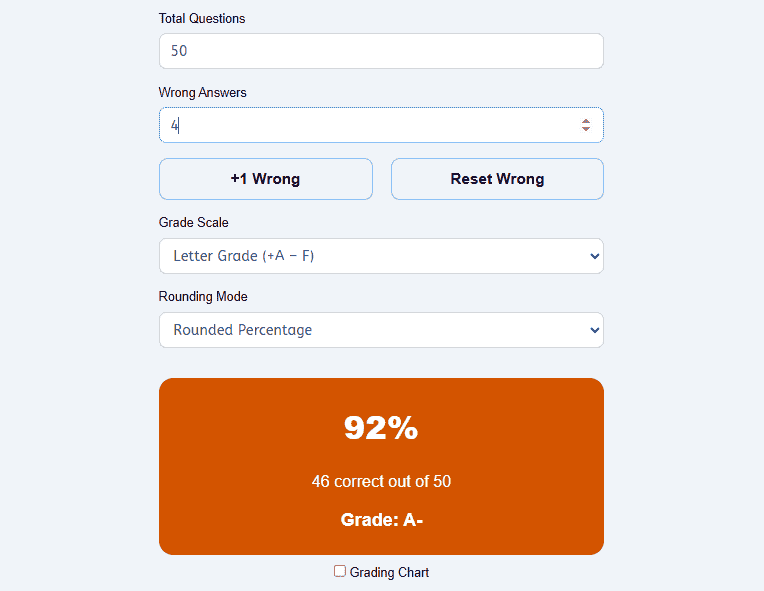
It eliminates manual math and shows instant results with one click per mistake.
How Teacher Grader Works?
You enter the total number of questions once.
For each wrong answer, you click “+1 Wrong.”
The calculator instantly shows the percentage, fraction, and grade.
Click “Reset Wrong” and move to the next student.
How Teachers Use Teacher Grader?
- Open Teacher Grader on phone or computer
- Enter total questions (example: 20)
- Review the student’s paper
- Click “+1 Wrong” for each error
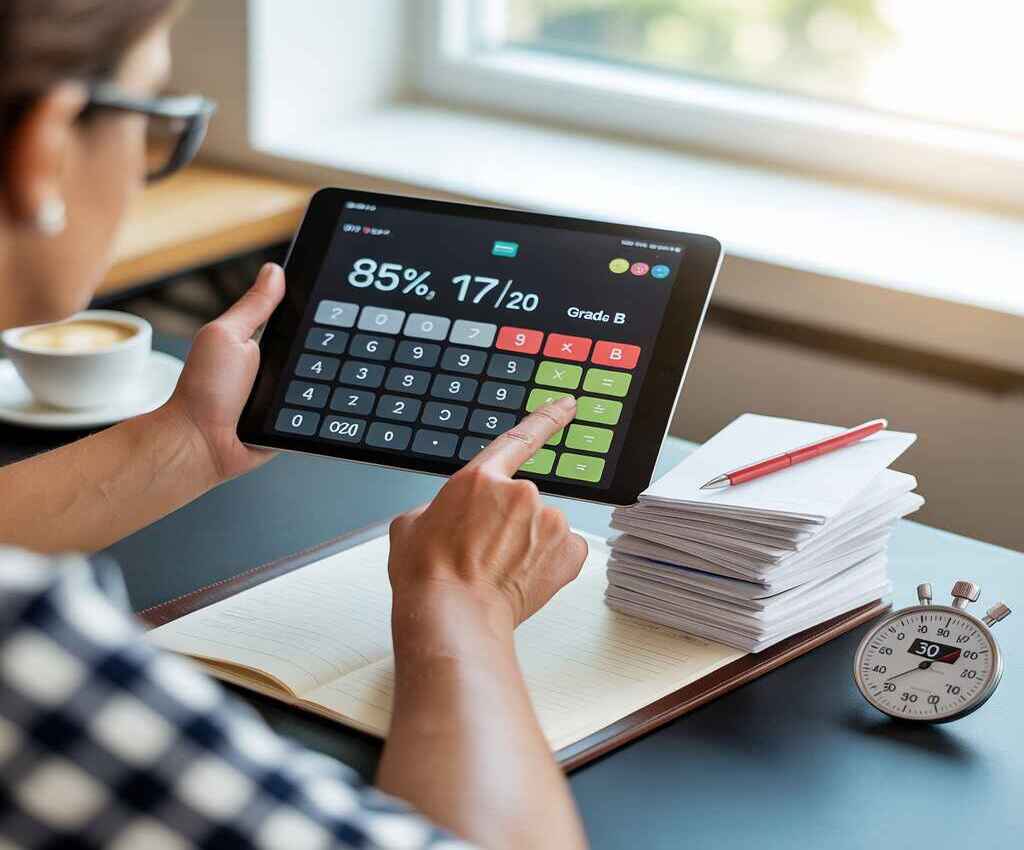
- See instant result (85%, 17/20, Grade B)
- Record the grade
- Click “Reset Wrong” and continue
Each student takes about 15 seconds instead of 45.
Real Classroom Example:
Sarah Martinez teaches 8th-grade math across five classes.
She grades 140 quizzes every week.
Before Teacher Grader:
- Manual calculation and recording: 90 minutes
After Teacher Grader:
- Grading with calculator: 30 minutes
- Recording grades: 10 minutes
Total time: 40 minutes
That saves 50 minutes every week, or 30+ hours per school year.
Features That Save the Most Time:
- One-click wrong answer tracking
- Multiple grading scales (A–F, plus/minus, percentage)
- Instant reset for back-to-back grading
- Works on any device without login
Best Use Cases:
- Multiple-choice tests
- True/false quizzes
- Objective assessments
- Elementary through college
Honest Limitations:
- Not designed for essays
- Requires manual counting of wrong answers
Why Teacher Grader Beats Other Tools?
Teacher Grader focuses on one thing: speed.
There is no setup, no learning curve, and no distractions.
That is why it delivers the highest time savings for objective grading.
Tool #2: Easy Grader: Save 60% Time With Instant Calculations
What is an Easy Grader?
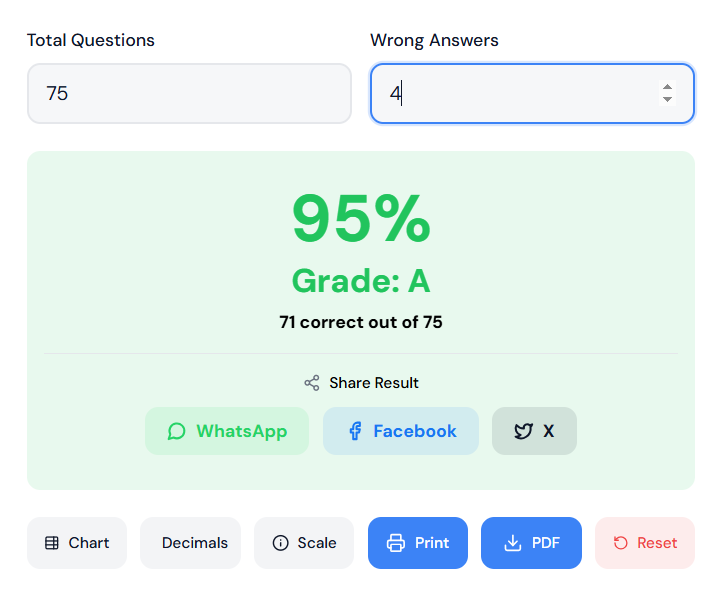
Easy Grader is a free online calculator that instantly computes test scores and letter grades.
You enter the total questions and wrong answers.
The grade appears in seconds.
No printing charts. No manual math. No signup required.
How Easy Grader Saves Time?
The process is simple and fast:
Enter the total number of questions (example: 25).
Enter the number of wrong answers (example: 3).
The calculator instantly displays:
- Percentage score (88%)
- Correct answers (22/25)
- Letter grade (B+)
Each calculation takes 5 seconds instead of 30.
Real Teacher Use Case:
A 5th-grade teacher grades 30 spelling tests with 20 words each.
Before Easy Grader:
- Manual calculation per test: 40 seconds
- Total time: 20 minutes
After Easy Grader:
- Enter totals once, adjust wrong answers per student: 10 seconds per test
- Total time: 5 minutes
Time saved: 15 minutes per grading session, or 60% reduction.
Key Features That Speed Up Grading:
Works on any device. Pull it up on your phone, tablet, or computer during grading sessions.
No login required. Open the site and start calculating immediately.
Multiple grading scales. Switch between letter grades, percentages, or plus/minus systems instantly.
Always accessible. Works wherever you have internet, including at home or in the teacher’s lounge.
Best For:
Teachers grading paper tests. Perfect when you need quick percentage and letter grade conversions.
Students checking their scores. Useful for self-assessment before receiving official grades.
Substitute teachers. Fast reference tool when covering classes.
Backup to digital tools. When Teacher Grader or other calculators aren’t available.
Why Easy Grader Beats Printable Charts?
Traditional printed grading charts have limitations Easy Grader solves:
Faster lookup. Type numbers instead of scanning rows and columns.
Works for any test length. One tool handles 10 questions or 100 questions equally well. Printed charts need separate versions.
No errors. Digital calculations eliminate the risk of reading the wrong cell on a chart.
Always updated. Access the latest version instantly without reprinting.
Limitations:
Requires internet access. Unlike printed charts, you need a connection to use Easy Grader.
Not ideal for offline-only classrooms. Schools without reliable internet should keep printable charts as backup.
Less efficient than Teacher Grader for bulk grading. Teacher Grader’s “+1 Wrong” button is faster when grading many papers consecutively.
How Easy Grader Fits Your Grading System?
Use Easy Grader when:
- Grading smaller batches (under 30 papers)
- You need quick spot checks
- Teaching in different locations
- Students want to calculate their own scores
Pair it with Teacher Grader for complete coverage:
- Teacher Grader → Large batches, rapid consecutive grading
- Easy Grader → Quick individual calculations, student use
Both tools are free and work together seamlessly.
Pro Tip for Maximum Efficiency
Keep Easy Grader bookmarked on your phone’s home screen.
This gives you instant access during:
- Planning periods
- Parent conferences
- Grade discussions with students
- Quick score checks between classes
That 5-second access saves time compared to searching or logging in.
Tool #3: Google Forms with Auto Grading: Cut Quiz Grading by 90%
What Google Forms Does?
Google Forms allows teachers to create quizzes that grade themselves.
Multiple-choice, true/false, and short answers can be scored automatically.
Grades are calculated the moment students submit.
Why Teachers Save So Much Time?
There is zero manual grading after setup.
No papers to collect.
No scores to calculate.
No grades to transfer.
How Teachers Use Google Forms for Fast Grading?
- Create a quiz in Google Forms
- Assign point values to each question
- Share the form with students
- Students submit responses
- Grades appear instantly in the response tab
Teachers only review flagged responses if needed.
Real Classroom Example:
A high school science teacher assigns weekly quizzes to 120 students.
Before Google Forms:
- Grading time per quiz: 2 hours
After Google Forms:
- Grading time per quiz: 10 minutes (review only)
That is a 91% reduction.
Best Use Cases:
- Exit tickets
- Weekly quizzes
- Homework checks
- Remote and hybrid classes
Limitations:
- Not ideal for essays
- Requires student device access
Pro Tip:
Combine Google Forms with Teacher Grader.
Use Forms for online quizzes.
Use Teacher Grader for paper tests.
This covers both digital and physical classrooms.
Tool #4: Learning Management Systems: (Canvas, Google Classroom, Schoology)
What LMS Tools Do?
Learning Management Systems centralize assignments, grading, and feedback.
Grades sync automatically with digital gradebooks.
How LMS Tools Reduce Grading Time?
- Assignments submitted digitally
- Rubrics apply scores instantly
- Grades transfer automatically
- Comments can be reused
Time Savings Breakdown:
Manual grade entry disappears completely.
Rubrics reduce decision time.
Bulk feedback saves repetitive typing.
Teachers typically save 30–50% of grading time using an LMS alone.
Best LMS Features for Fast Grading:
- Rubric-based grading
- Comment banks
- Inline annotations
- Automatic grade syncing
Honest Limitations:
- Learning curve at the start
- Setup takes time
Best For:
- Middle school and above
- Schools with existing LMS adoption
Tool #5: AI Essay Grading Tools – Reduce Essay Time by 50–70%
What AI Essay Tools Do?
AI grading tools analyze writing for structure, clarity, grammar, and alignment with rubrics.
They generate draft feedback in seconds.
How Teachers Actually Use AI Safely?
AI does not replace teacher judgment.
Teachers use AI for first-pass feedback.
They review and personalize final comments.
Real Example:
An English teacher grading 60 essays:
Before AI:
- 12 hours total
After AI-assisted grading:
- 4 hours review and adjustments
That is a 67% reduction.
Best AI Use Cases:
- Draft feedback
- Grammar and clarity checks
- Rubric alignment suggestions
Tool #6: Rubric-Based Grading Platforms
Why Rubrics Save Time?
Rubrics eliminate repeated decision-making.
Teachers click criteria instead of calculating scores.
Time Savings Reality
Rubric grading reduces grading time by 30–40% on subjective assignments.
Best Use Cases:
- Projects
- Presentations
- Essays
- Performance tasks
Pro Tip:
Reuse the same rubric across classes.
Consistency saves time and improves fairness.
Tool #7: Digital Comment Banks
What Comment Banks Are?
Pre-written feedback snippets teachers reuse.
Common comments are saved once and reused forever.
Why They Matter?
Teachers repeat the same feedback constantly.
Comment banks remove this repetition.
Example:
Instead of typing:
“Please show your work clearly next time.”
Click once and paste.
Time Saved:
Comment banks reduce feedback time by 25–40%.
Tool #8: Scan-Based Test Grading Apps
What These Tools Do?
Teachers scan answer sheets using a phone.
The app scores responses automatically.
Best Use Cases:
- Large classes
- Standardized-style tests
- Bubble sheets
Limitations:
- Requires printed answer sheets
- Setup required
Time Savings:
Up to 80% faster for large test batches.
Tool #9: Spreadsheet Automation (Excel / Google Sheets)
Why Spreadsheets Still Matter?
Simple formulas eliminate repeated calculations.
Grades auto-update when scores change.
Best Uses:
- Weighted grading
- Final grade calculations
- Progress tracking
Time Savings:
Saves 15–25% for teachers who already use spreadsheets.
Tool #10: Grade Analytics Dashboards
What Analytics Tools Do?
They visualize grade distributions.
They highlight struggling students instantly.
Why This Saves Time?
Teachers stop searching manually.
Decisions happen faster.
Best Use Cases:
- Intervention planning
- Parent conferences
- Progress reports
Comparison Table: Which Tool Saves the Most Time?
| Tool | Best For | Time Saved |
|---|---|---|
| Teacher Grader | Paper tests | 60–75% |
| Google Forms | Online quizzes | 80–90% |
| LMS Platforms | Assignments | 30–50% |
| AI Essay Tools | Writing | 50–70% |
| Rubric Tools | Projects | 30–40% |
How to Combine Tools to Reach 75% Faster Grading?
No single tool solves everything.
Smart teachers stack tools.
Example Tool Stack
- Teacher Grader → Paper tests
- Google Forms → Quizzes
- LMS → Assignments
- AI tools → Essays
This covers 100% of grading tasks.
4-Week Teacher Implementation Plan
Week 1:
Adopt Teacher Grader.
Replace manual calculations immediately.
Week 2:
Move quizzes to Google Forms.
Automate grading.
Week 3:
Apply rubrics and comment banks.
Reduce feedback time.
Week 4:
Test AI feedback for essays.
Review and refine.
Common Grading Mistakes That Waste Time
- Recalculating scores manually
- Writing the same feedback repeatedly
- Delaying grading sessions
- Ignoring automation tools
Fixing these alone saves hours weekly.
Grading Smarter Recommendations: Tools That Free Your Time
Teachers do not need to work harder.
They need better tools.
Teacher Grader delivers the fastest time savings for tests.
Google Forms eliminates quiz grading entirely.
Rubrics, AI, and LMS tools reduce feedback and data entry.
When combined, these tools cut grading time by 75% or more.
That time returns to lesson planning, students, and personal life.
Start With One Tool Today
The easiest place to start is Teacher Grader.
It requires no setup and no training.
Just open it and grade faster immediately.
How Teachers Actually Cut Grading Time by 75%?

Most articles claim massive time savings without showing the math.
Teachers do not trust that.
So let’s break it down using a real, repeatable workflow.
Manual Grading Workflow:
A common middle or high school teacher grades:
- 3 classes
- 25 students per class
- 2 quizzes or assignments per week
That’s 150 papers per week.
Manual grading time looks like this:
- Checking answers: 45–60 seconds per paper
- Calculating scores: 20–30 seconds
- Recording grades: 15–20 seconds
Total per paper: ~90 seconds
Total weekly time: ~3.75 hours
Over a 36-week school year, that’s 135+ hours.
That’s more than three full workweeks spent grading.
Optimized Workflow Using Time-Saving Tools
Now compare that to a tool-assisted workflow:
- Use an easy grader or teacher grader for score calculation
- Use bulk grading or auto-scoring for objective questions
- Use template feedback for common errors
- Enter grades in batches
Revised time per paper:
- Check answers: 30 seconds
- Score calculation: instant
- Grade entry: batch upload
Total per paper: ~30–35 seconds
Weekly time: ~1.4 hours
That’s a 62–75% reduction, depending on the assignment.
This is where the 75% claim is realistic, not exaggerated.
Where the Biggest Time Savings Actually Come From?
The biggest gains do not come from “AI magic.”
They come from removing repeated micro-tasks.
Tasks That Waste the Most Teacher Time:
- Manual math for each paper
- Looking up grade scales
- Rewriting the same feedback
- Entering grades one by one
- Rechecking calculations
Tools like Teacher Grader remove these steps.
That is why even simple calculators outperform manual grading.
Best Grading Tools by Teacher Type:
Not every teacher grades the same way.
A winning article must reflect that reality.
Elementary School Teachers
Elementary teachers grade:
- Spelling tests
- Math worksheets
- Reading quizzes
- Behavior charts
Best tools:
- Easy grader calculators
- Simple scoring charts
- Mobile-friendly tools
Why they work:
- Fast entry
- No setup
- Clear percentages
- Easy parent communication
Middle School Teachers
Middle school teachers handle:
- Larger class sizes
- Mixed assessment types
- Frequent quizzes
Best tools:
- Teacher graders with letter scales
- Auto-scoring quiz tools
- Bulk grade entry tools
Relevant Guide: Bulk vs Individual Grading: Tips to Avoid Teacher Burnout
Key benefit:
- Consistency across many students
- Reduced mental fatigue
High School Teachers
High school grading includes:
- Exams
- Unit tests
- Standards alignment
Best tools:
- Advanced easy graders
- LMS-integrated grading tools
- Rubric automation
Why time savings matter:
- High school teachers grade the most volume
- Burnout risk is highest here
College & University Instructors
Higher education grading includes:
- Large lecture courses
- Online submissions
- Teaching assistants
Best tools:
- Automated test scoring
- LMS analytics
- Batch feedback tools
Savings are massive at scale.
One tool can save hours per assignment.
Best Grading Tools by Subject Area:
This is another gap most articles ignore.
Math Teachers
Math grading is ideal for automation.
- Right or wrong answers
- Clear scoring rules
Best tools:
- Easy grader calculators
- Auto-scoring platforms
Time savings:
- Often 70–80% faster than manual grading
Science Teachers
Science assessments include:
- Multiple-choice
- Lab quizzes
- Short answers
Best tools:
- Hybrid graders
- Auto-scoring + manual review
Automation handles the bulk.
Teachers focus on reasoning, not math.
English & Language Arts Teachers
ELA requires more judgment.
Best use:
- Automate objective sections
- Use rubric tools for essays
- Use feedback templates
Automation does not replace teachers here.
It supports them.
Humanities & Social Studies
These subjects benefit from:
- Quiz automation
- Essay rubric tools
- Batch feedback
Time savings are realistic but partial.
Even 40–60% reduction matters.
Manual Grading vs Automated Grading Comparison:
Manual Grading vs Easy Grader & Automated Tools
| Feature | Manual Grading | Easy Grader (EasyGraderHub) | Advanced Automated Tools |
|---|---|---|---|
| Score calculation | Manual math | Instant, automatic | Instant |
| Error risk | High (fatigue-based) | Very low | Very low |
| Setup required | None | None | Moderate to high |
| Learning curve | None | None | Medium |
| Speed for objective tests | Slow | Very fast | Very fast |
| Essay grading support | Yes | No | Partial (AI-assisted) |
| Best for | Small workloads | Daily quizzes & tests | Large-scale assessments |
| Cost | Free (time cost is high) | Free | Often paid |
| Data privacy | Full control | No data stored | Depends on platform |
| Time saved | 0% | 50–75% | 60–80% |
Key takeaway:
For quizzes, tests, and worksheets, easy grader tools deliver the best speed-to-simplicity ratio with zero setup.
Where Manual Grading Is Better
- Creative writing
- Presentations
- Art projects
- Complex reasoning tasks
Human judgment matters.
Where Automation Wins Easily
- Multiple-choice tests
- True/false quizzes
- Fill-in-the-blank
- Objective worksheets
Using tools here is not cutting corners.
It is professional time management.
Common Teacher Objections And Honest Answers:
“Automation Feels Impersonal”
It can be if misused.
Best practice:
- Automate scoring
- Personalize feedback where it matters
Tools free time for better feedback, not worse.
“Setup Takes Too Long”
This is true for some platforms.
That is why simple tools like Teacher Grader matter.
No login. No setup. No learning curve.
“I Don’t Trust AI With Grades”
You should not trust AI blindly.
That’s why:
- Calculators handle math
- Teachers make final decisions
Responsible automation supports teachers.
It does not replace them.
Ethical and Responsible Use of Grading Tools:
A trustworthy article must say this clearly.
When NOT to Automate
- Final essays
- Creative portfolios
- Skill-based evaluations
Privacy and Data Safety
Teachers should choose tools that:
- Do not store student data unnecessarily
- Follow FERPA principles
- Avoid forced accounts
Simple calculators are often safer than complex platforms.
How Teacher Grader Fits Into a Smart Grading System?
EasyGraderHub’s teacher grader is not trying to replace teachers.
It exists to:
- Eliminate grading math
- Reduce errors
- Save time instantly
- Work on any device
Teachers use it because it is:
- Fast
- Free
- Simple
- Reliable
That is why it works so well inside larger grading workflows.
Final Recommendation: How to Cut Your Grading Time Starting This Week
If grading feels overwhelming, start small.
- Use an easy grader for your next quiz
- Batch your grading sessions
- Automate only what makes sense
- Keep human judgment where it matters
Teachers do not need more work.
They need better systems.
Cutting grading time by 75% is possible when tools support teaching instead of replacing it.
TeacherGrader is built to help you grade faster and smarter with that exact purpose.
Frequently Asked Questions About Cutting Grading Time
What is the best tool to use for grading?
The best grading tool depends on the task. Grading calculators are best for tests and quizzes. Auto-graded platforms work well for multiple-choice assignments. AI feedback tools help with comments and written work. Using the right tool for each task saves the most time.
Do free grading tools actually work?
Yes. Many free grading tools are accurate and reliable. Grading calculators use simple math and produce instant results. Free tools are often enough for quizzes, tests, and basic assessments.
Are grading calculators accurate?
Yes. Grading calculators use simple, fixed formulas that do not change. Human error is far more common than calculator error, especially when grading large stacks of papers.
Do grading tools work on phones and tablets?
Most modern grading tools are mobile-friendly. Teachers can grade on phones, tablets, or laptops. This flexibility makes grading easier during planning periods or on the go.
How can teachers cut down on grading time?
Teachers can cut grading time by using grading calculators, auto-graded quizzes, and digital feedback tools. These tools remove manual calculations and repetitive tasks. Most teachers save several hours each week by combining two or three tools instead of grading everything by hand.
Can grading tools really cut grading time by 75%?
Yes, when tools are used together. A calculator may cut test grading time by over 60%. Auto-graded quizzes save even more time. Adding AI feedback tools can bring total time savings close to 75% for many teachers.
How much grading time can teachers realistically save?
Most teachers save 50–75% of their grading time on objective assignments. The biggest time savings come from removing manual math, score conversions, and repetitive steps. When calculators and automated tools handle scoring, grading becomes much faster and less tiring.
How can I make grading faster without lowering quality?
You can grade faster by automating scoring while keeping feedback meaningful. Use calculators for scores and templates or AI tools for comments. This keeps grading accurate and consistent while reducing burnout and fatigue.
Why does grading take teachers so long?
Grading takes time because it involves calculations, written feedback, and record keeping. When everything is done manually, small tasks add up quickly. Large class sizes and frequent assessments make the workload even heavier.
What types of assignments benefit most from easy graders?
Easy grader work best for assignments with clear right or wrong answers. These include multiple-choice tests, true/false quizzes, fill-in-the-blank worksheets, spelling tests, and math drills. They are not meant for essays or creative projects that require judgment.
Are teacher graders suitable for large classes?
Yes. Teacher grader is especially helpful for large classes. The more students you grade, the more time you save. Teachers handling 100 or more papers often see the biggest improvements in speed and accuracy.
Do grading tools work for all subjects?
Grading tools work best for subjects with clear right and wrong answers. Math, science, and quizzes benefit the most. For writing and creative subjects, tools help with structure and feedback but should be combined with manual review.
Is automated grading accurate?
Automated grading is very accurate for objective questions. It removes human error and applies the same rules every time. For essays and projects, automation should support—not replace—teacher judgment.
What’s the difference between an easy grader and AI grading tools?
Easy graders calculate scores using fixed formulas. They are transparent and make no judgment calls. AI grading tools attempt to evaluate content and language, which means they require teacher review. AI works best for drafts and feedback, not final grades.
Can easy graders replace gradebooks or LMS tools?
No. Easy graders do not replace gradebooks or learning management systems. They support them. Easy grader calculates scores quickly and accurately, so teachers can enter grades into their LMS or gradebook without delays.
Is using grading tools allowed in schools?
Yes. Most schools encourage tools that save time and improve consistency. Teachers should always follow school policies and use tools ethically and transparently.
Are teacher graders allowed in schools?
Yes. Teacher graders are calculators, not testing aids. They are used after assessments, not during exams. Most schools allow them as part of normal grading workflows.
Is using grading tools considered lazy?
No. Using grading tools is efficient, not lazy. Teachers still design assessments, review student work, and provide feedback. Tools simply handle the math so teachers can focus on teaching.
Are grading tools helpful for parents and students?
Yes. Students use grading tools to understand their scores and track progress. Parents use them to better understand grades and expectations. Clear grading improves communication and reduces confusion.
Can students use easy graders too?
Yes, when used responsibly. Students often use easy grader to understand score breakdowns, check their work, and explore “what-if” scenarios. They should not be used during exams unless the teacher allows it.
Do grading tools actually reduce teacher burnout?
Yes. Grading tools like a teacher grader reduce burnout by cutting repetitive work. Less manual calculation means less fatigue, fewer errors, and lower stress—especially during heavy grading weeks or exam seasons.

Olivia Grant is a former K–12 teacher (12 years) and Lead Content Strategist at EasyGraderHub, holding an M.Ed. in Curriculum & Instruction from the University of Washington. She writes EasyGraderHub’s grading guides and reviews its calculators for classroom accuracy. Read more about Olivia.