
Grading is an essential part of teaching, but it often takes longer than it should. Many educators ask, how long should grading take while still giving students meaningful feedback. The reality is that most teachers spend far more time than necessary. With the right approach, you can reduce grading time by 50% without losing accuracy or fairness. This article reveals 10 practical strategies to streamline grading and save valuable hours each week. These methods help you maintain accuracy and keep your focus on what matters most about student learning.
Grading a 20-question test should take 30 seconds per paper. Essays need 5-10 minutes each. Research papers require 15-20 minutes per student.
But most teachers spend double or triple these times.
I’ve been teaching for 12 years. I used to spend 15 hours every week grading papers. That’s 600 hours per school year—gone.
Now I spend 6-7 hours weekly. Same number of students. Same quality feedback. Here’s how I did it.
Quick Navigation:
The Real Numbers: How Long Does Grading Actually Take?
Let me show you the hard data first.
Average teacher grading time per week: 10-13 hours
Time spent grading at home: 7-9 hours weekly
Minutes per essay: 8-12 minutes
Minutes per research paper: 18-25 minutes
These numbers come from a 2024 teacher workload survey. Over 2,000 teachers reported their actual grading time.
Here’s the breakdown by assignment type:
Quick Reference: Grading Time Benchmarks
| Assignment Type | Typical Time | Target Time | With Tools |
|---|---|---|---|
| Multiple choice (20Q) | 2-3 min | 1 min | 30 sec |
| True/False (15Q) | 90 sec | 45 sec | 20 sec |
| Short answer (5Q) | 5 min | 3 min | 2 min |
| Essay (5 paragraphs) | 10 min | 6 min | 4 min |
| Research paper (10 pages) | 20 min | 12 min | 10 min |
The problem? Most teachers don’t hit these target times.
Why not? They’re using slow, outdated grading methods.
Is Grading Taking Too Long? Three Warning Signs
You’re spending too much time grading if:
- You grade past 10 PM regularly – This signals inefficient methods
- Grading takes longer than lesson planning – Should be equal or less
- You dread looking at the stack – Mental resistance slows you down
I hit all three warning signs in my third year of teaching.
That’s when I started testing faster grading methods. The 10 secrets below cut my time by 55%.
Secret #1: Use a Teacher Grade Calculator (Saves 50% of Time)
This is the biggest time-saver for any numerical grading.
The old way: You calculate each grade manually. You double-check your math. You worry about mistakes.
Time per paper: 45-60 seconds
Time for 30 papers: 22-30 minutes
Mental energy: High
The fast way: Use an online teacher grader that does instant calculations.
I use Teacher Grader for all tests and quizzes.
Why This Tool Saves Massive Time
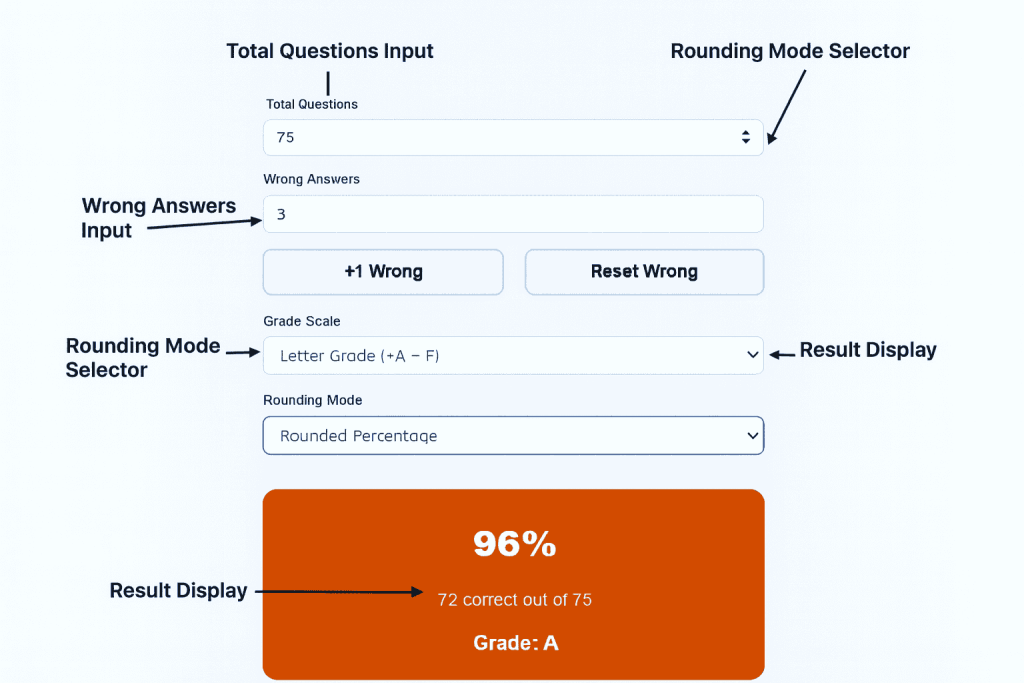
Feature #1: Simple Interface
It loads in under 2 seconds. No account needed. No learning curve.
Feature #2: +1 Wrong Button
Just click once for each wrong answer. No typing numbers. No keyboard needed.
Feature #3: Instant Reset
One click clears all data. Start the next paper immediately.
Feature #4: Dual Grading Scales
Choose Letter Grade (A-F) or Letter Grade (+A-F). Switch anytime.
Feature #5: Complete Results Display
Shows three things at once:
- Percentage score (85%)
- Correct answers (17 correct out of 20)
- Letter grade (Grade: B)
Feature #6: Built-in Grading Chart
See the full grade scale below your results. Reference any score instantly.
Real Classroom Example
I teach 140 students across 5 classes. Every Friday is quiz day.
Before using the teacher grader:
- Time to grade 140 quizzes: 90-105 minutes
- Calculation errors: 3-5 per batch
- Stress level: High
After using the teacher grader:
- Time to grade 140 quizzes: 25-30 minutes
- Calculation errors: Zero
- Stress level: Low
That’s 70 minutes saved. Every single week.
Step-by-Step: How to Use It
- Open the teacher grader tool
- Enter total questions (example: 20)
- Count wrong answers on first paper
- Click “+1 Wrong” for each mistake
- Read the grade instantly (85%, 17/20, Grade: B)
- Write the grade on the paper
- Click “Reset Wrong” button
- Start the next paper
Average time per paper: 15-20 seconds
For 30 students: 7-10 minutes total
Compare that to 22-30 minutes manually. You save 15-20 minutes per class.
Annual time savings: 40-50 hours per year (just from this one tool)
⚡ Which really saves more time — Manual vs calculator: See the time difference
Secret #2: Grade by Question, Not by Student
Most teachers grade wrong. They finish one student’s entire test first. Then move to the next student.
This method wastes time.
Why it’s slow: Your brain switches between different answer keys. You lose focus. You slow down.
The faster method: Grade question #1 for everyone first. Then grade question #2 for everyone.
How to Do It
- Stack all papers together (30 papers in one pile)
- Look at question #1 only
- Mark it right or wrong on every paper
- Move to question #2
- Repeat until finished
Why this works: Your brain stays locked on one answer. No switching. No confusion.
Time saved: 20-30% faster
I learned this from my mentor teacher. She graded 35 tests in 45 minutes using this method.
I now grade the same number in 40 minutes. Before, it took me 75 minutes.
Secret #3: Stop Grading Everything
Not every assignment needs a formal grade.
This sounds wrong. But research backs it up.
The truth: Students learn from feedback, not from grades. Practice work doesn’t need grades.
What to Grade for Completion Only
- Daily homework (check 2-3 problems, mark complete/incomplete)
- Rough drafts (mark done/not done)
- Practice worksheets (spot check)
- Bell ringers and exit tickets (check for participation)
- Class notes (verify they took them)
What Needs Real Grades
- Tests and quizzes
- Final drafts of essays
- Projects and presentations
- Major assignments (worth 10%+ of grade)
Time saved: 40-50% of total grading hours
I implemented this in September. By October, I cut 4 hours weekly from my grading load.
Student performance? It stayed the same. Actually, it improved slightly.
Why? I returned graded work faster. They got better feedback on what mattered.
Secret #4: The 5-Paper Rule (Prevents Burnout)
Your brain gets tired after 30-40 minutes of continuous grading.
You make mistakes. You get inconsistent. Quality drops.
The solution: Grade only 5 papers at a time. Then take a 5-minute break.
My Grading Schedule
- Grade 5 papers (12-15 minutes)
- Break (5 minutes – stretch, water, walk)
- Grade 5 more papers (12-15 minutes)
- Break (5 minutes)
- Repeat
For 30 papers, this takes 2 hours with breaks. Without breaks? Still 2 hours, but quality suffers.
The benefit: You stay sharp. Grading stays consistent. Students get fair feedback.
Secret #5: Create a Numbered Comment Bank
Stop writing the same comments over and over.
The problem: You write “Good thesis” 20 times per essay assignment. You write “Check grammar” 30 times.
This wastes 10-15 minutes per essay stack.
The solution: Number your common comments. Write only numbers on papers.
Example Comment Bank for Essays
- Strong introduction with clear hook
- Thesis needs more specificity
- Add textual evidence here
- Good analysis of this quote
- Check subject-verb agreement
- Excellent use of transitions
- Paragraph needs clearer topic sentence
- Watch comma splices
- Strong conclusion ties back to thesis
- Citation format incorrect
How to Use It
- Print the list for students
- Write numbers on their papers (example: “1, 5, 9”)
- Students look up what each number means
- You spend 10 seconds per comment instead of 45 seconds
Time saved: 60% on essay feedback time
For 30 essays at 10 minutes each, that’s 5 hours saved per assignment.
Secret #6: Focus Feedback (Pick 2-3 Things Only)
Don’t mark every error. This overwhelms students and exhausts you.
Better approach: Choose 2-3 focus areas per assignment.
This Week’s Focus Areas
For next week’s essay:
- Thesis clarity (mark only this)
- Evidence quality (mark only this)
- Skip grammar (unless it blocks meaning)
- Skip formatting (mention once at top)
Why This Works
For students: They can process 2-3 areas of improvement. They can’t process 15.
For you: You grade 40% faster. You stay focused on what matters most.
For learning: Research shows focused feedback improves student performance more than comprehensive marking.
Rotate your focus areas every 2-3 weeks. By semester’s end, you’ve covered everything.
Time saved: 35-40% on detailed assignments
Secret #7: Grade During Class (Strategic Timing)
You don’t have to grade everything at home.
Key question: When are students working independently?
Use that time to grade.
Best Times to Grade During Class
- Silent reading (grade previous day’s exit tickets)
- Independent practice (grade homework checks)
- Test-taking (grade yesterday’s quiz after students finish)
- Computer lab time (grade while monitoring)
- Project work days (grade between helping students)
Important rule: Stay available for questions. Grade only during truly independent work.
I grade 20-25 papers weekly during class time. That’s 2-3 hours I don’t take home.
Time saved: Eliminates 2-3 hours of after-school grading
Secret #8: Student Self-Assessment First
Let students find their own errors before you grade.
This sounds risky. But it’s incredibly effective.
How It Works
- Hand back assignments ungraded
- Give students the answer key or rubric
- They mark their own mistakes
- They submit with self-assessment
- You verify accuracy (takes 20-30 seconds per paper)
Time per paper: 30 seconds (instead of 5 minutes)
Works best for:
- Math problems
- Grammar worksheets
- Multiple choice practice
- Reading comprehension
Time saved: 80% on practice assignments
One warning: Spot-check thoroughly at first. Some students need training to self-assess honestly.
Secret #9: Batch Similar Tasks Together
Grade all multiple choice tests on Monday. Grade all essays on Tuesday.
Don’t switch between different assignment types.
Why batching works: Your brain uses different skills for different tasks. Switching wastes time.
My Weekly Grading Schedule
- Monday: All multiple choice (use teacher grader)
- Tuesday: All short answer questions
- Wednesday: Essays and written work
- Thursday: Projects and presentations
- Friday: Quick checks and completion grades
Each day uses one grading mindset. No switching. No mental fatigue.
Time saved: 15-20% through improved focus
Secret #10: Set Honest Timelines (Reduce Guilt)
Stop promising 2-day returns on major assignments.
This creates stress. Stress slows you down.
Better approach: Set realistic deadlines and meet them consistently.
Realistic Return Timelines
- Quizzes: 1-2 class periods
- Tests: 3-5 days
- Short essays: 1 week
- Research papers: 2 weeks
- Projects: 2-3 weeks
Communicate clearly: Tell students exactly when they’ll get work back.
The psychology: When you set honest deadlines, you don’t rush. You work at your natural pace.
Result: Better quality feedback in less stressful time.
Answering Common Teacher Questions
How long do teachers spend grading each week?
The average is 10-13 hours weekly. Experienced teachers often spend 8-10 hours. New teachers spend 12-15 hours.
This includes grading at school and at home.
How long should grading take per student?
For a full grade book of assignments:
- 30 students: 6-8 hours weekly
- 100 students: 12-15 hours weekly
- 150 students: 15-18 hours weekly
With efficient methods, cut these times by 40-50%.
Is there a faster way to grade papers?
Yes. The three fastest methods are:
- Use a teacher grader calculator for numerical grading
- Grade by question instead of by student
- Use numbered comment banks instead of writing full comments
These three alone save 5-7 hours per week.
How can teachers grade faster without sacrificing quality?
Focus feedback on 2-3 key areas instead of marking everything. Research shows this improves student learning more than comprehensive marking.
Use tools for calculation. Save your energy for meaningful feedback.
My Complete Transformation: Before and After
Let me show you real numbers from my own teaching.
Before These Methods (2018)
- Students: 140 across 5 classes
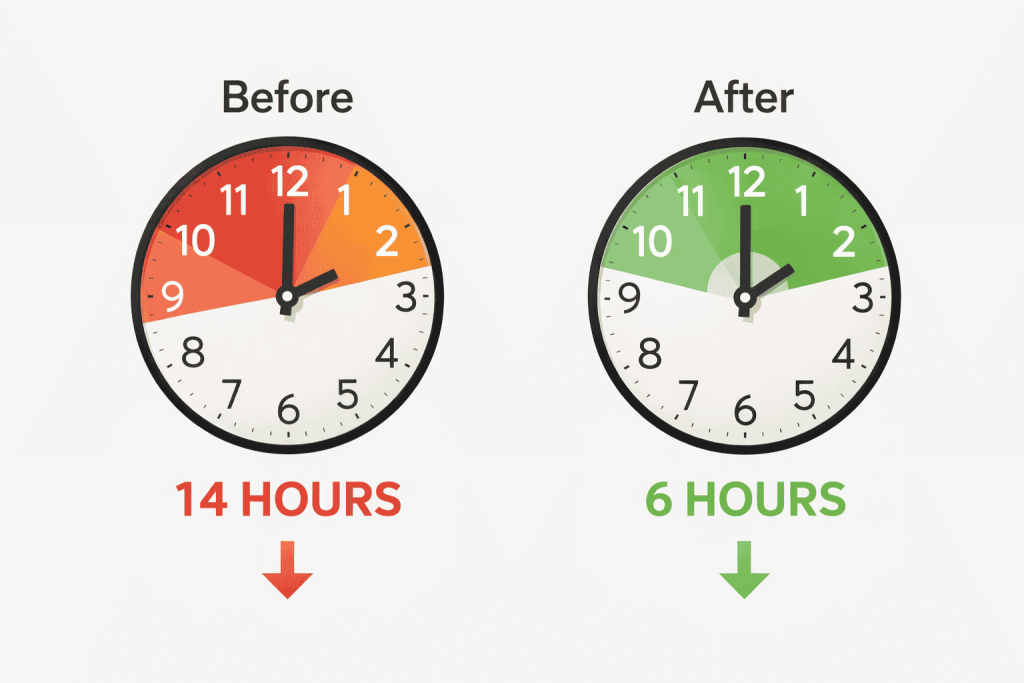
- Weekly grading time: 14-16 hours
- Where I graded: 11 hours at home, 3 hours at school
- Stress level: Very high
- Work-life balance: Poor
After These Methods (2024)
- Students: 145 across 5 classes (more students now)
- Weekly grading time: 6-7 hours
- Where I grade: 4 hours at home, 2-3 hours at school
- Stress level: Manageable
- Work-life balance: Good
Total time saved: 8-9 hours per week
Annual savings: 320-360 hours per year
That’s two full months of time I got back. Time for better lesson planning. Time for my family. Time for myself.
Frequently Asked Questions (FAQs)
How much time does grading take?
The average teacher spends 10-13 hours per week grading. This breaks down to about 95 minutes daily.
New teachers often spend 12-15 hours weekly. Experienced teachers typically spend 8-10 hours.
For specific assignments:
- Multiple choice test (20 questions): 30 seconds – 2 minutes per paper
- Short essay (5 paragraphs): 8-12 minutes per paper
- Research paper (10 pages): 18-25 minutes per paper
With a teacher grader calculator, these times drop by 50% to 75%.
Is an 89.5 an A or B?
This depends on your grading scale and rounding policy.
Standard rounding: 89.5% rounds up to 90%, which is an A.
Without rounding: 89.5% stays as 89%, which is a B.
Most teachers round 0.5 and above to the next whole number. Check your school’s grading policy.
The teacher easy grader shows exact percentages. You decide whether to round up or down based on your policy.
Which grading method is the fastest?
The three fastest grading methods are:
1. Using a teacher grader calculator – Saves 50 to 75% of time on numerical grading
2. Grading by question instead of by student – Saves 20-30% of time
3. Using numbered comment banks – Saves 60% on essay feedback time
Combining all three can cut your total grading time in half.
For multiple choice and tests, a grading calculator is the fastest option by far.
How to reduce grading time?
Follow these five steps:
Step 1: Use a teacher grader for all numerical grading (saves 50%-75% immediately)
Step 2: Stop grading everything – mark some assignments for completion only
Step 3: Grade by question, not by student
Step 4: Create a comment bank for repeated feedback
Step 5: Focus on 2-3 areas per assignment instead of marking everything
These five steps can reduce weekly grading time from 12-15 hours to 6-7 hours.
How long does it take to grade cards?
If you mean report cards, most teachers spend 30-60 minutes per student for detailed comments.
For a class of 30 students, that’s 15-30 hours total.
Time-saving tip: Use a comment bank with pre-written statements. Mix and match comments to create personalized feedback in 10-15 minutes per student.
This cuts report card time from 30 hours to 5-8 hours.
What is the 80/20 rule of teacher talking time?
The 80/20 rule suggests teachers should talk only 20% of class time. Students should be active 80% of the time.
For grading: Apply this rule differently. Spend 20% of time grading, 80% on instruction and planning.
If you work 50 hours weekly, limit grading to 10 hours maximum. Use efficient methods to stay within this limit.
What is the 70/30 rule in teaching?
The 70/30 rule means students should be actively learning 70% of class time. Teacher direct instruction should be 30% or less.
For grading efficiency: Grade 70% of assignments for completion only. Grade 30% thoroughly with detailed feedback.
This focuses your energy on high-impact assessments. Practice work gets quick checks only.
How long should grading take per student?
Here are realistic benchmarks:
Per student per week:
- Elementary (one teacher, all subjects): 15-20 minutes
- Middle school (per class): 8-12 minutes
- High school (per class): 10-15 minutes
For a full class:
- 25 students: 6-8 hours weekly
- 100 students: 12-15 hours weekly
- 150 students: 15-20 hours weekly
With efficient methods, cut these times by 40-50%.
Is 89.5 an A or B in college?
Most colleges use standard rounding rules. An 89.5% rounds to 90%, which is typically an A.
However, some professors don’t round at all. An 89.5% would remain a B in their class.
Always check the syllabus for specific grading policies. When in doubt, ask your professor.
For teachers using grading tools: Set your rounding policy consistently. Use the same rule for all students.
Can I grade faster without lowering standards?
Yes. Faster grading doesn’t mean worse grading.
Key principle: Focus your energy on meaningful feedback. Use tools for mechanical tasks.
Example:
- Use a calculator for percentage calculations (mechanical task)
- Write focused comments on thesis and evidence (meaningful feedback)
- Skip marking minor grammar errors (not your priority this assignment)
Students learn more from focused, timely feedback than from comprehensive marking that arrives three weeks late.
What percentage of teacher time should be grading?
Grading should take 15-25% of your total work time.
Breakdown for a 50-hour work week:
- Teaching/instruction: 25-30 hours (50-60%)
- Planning/prep: 10-12 hours (20-25%)
- Grading: 8-10 hours (15-20%)
- Meetings/duties: 2-3 hours (4-6%)
If grading exceeds 25%, you need more efficient methods.
How many papers can a teacher grade in an hour?
This depends on assignment type:
With efficient methods:
- Multiple choice (with teacher grader): 100-120 papers per hour
- Short answer: 15-20 papers per hour
- Essays (with comment bank): 6-8 papers per hour
- Research papers (with rubric): 3-4 papers per hour
Without tools or methods:
- Multiple choice (manual): 20-30 papers per hour
- Short answer: 8-10 papers per hour
- Essays: 4-5 papers per hour
- Research papers: 2-3 papers per hour
The difference? Using a teacher grader and smart grading strategies.
Your Action Plan: Start This Week
Don’t try all 10 secrets at once. That’s overwhelming.
Start with these three:
Week 1: Add the Teacher Grader
Use Teacher Grader for your next test or quiz.
Time it. See how fast you grade compared to manual calculation.
Most teachers save 50-75% of time immediately.
Week 2: Try Grading by Question
Pick one multiple choice or short answer assignment. Grade by question instead of by student.
Notice how much faster and more consistent you are.
Week 3: Build a Simple Comment Bank
List your 10 most common comments. Number them. Use them on the next written assignment.
Track your time savings.
After 3 Weeks: Add More Secrets
Once these three become habits, add more:
- Implement the 5-paper rule
- Try focus feedback on next essay
- Set realistic return timelines
By month 3, use 5-7 secrets regularly. By month 6, they’ll feel automatic.
Common Mistakes Teachers Make
Mistake #1: Trying to Grade Everything Perfectly
Perfect grading isn’t possible. It’s not even helpful.
Better goal: Give clear, focused feedback quickly.
Mistake #2: Grading When Exhausted
Late-night grading takes twice as long. Quality suffers too.
Better approach: Grade when you’re alert. Save late nights for easier tasks.
Mistake #3: Avoiding Tools That Help
Some teachers think using a grading calculator is “taking shortcuts.”
Reality check: Using tools is smart, not lazy. Save your energy for meaningful feedback.
Mistake #4: Writing Too Much Feedback
Students rarely read more than 2-3 sentences of comments.
Better approach: Write less, but make it specific and actionable.
The Bottom Line: Time Is Your Most Valuable Resource
The average teacher works 53 hours per week. That’s 13 hours more than a standard job.
Grading takes up 20-25% of that time.
Using just 5 of these 10 secrets cuts grading time in half. That’s 5-7 hours back in your week.
Over a school year, that’s 200-250 hours. Over a career? Thousands of hours.
You deserve efficient systems that work.
Start Right Now
The fastest win? Use the teacher grader for your next assessment.
No signup required. No cost. Just faster, more accurate grading.
Try Teacher Grader and time yourself. See the difference in your first batch.
Then come back and implement one more secret each week.
Your future self will thank you. Your students will benefit from faster feedback. Your family will appreciate having you back.
Grading faster isn’t about cutting corners. It’s about working smarter.
Start today.
Frequently Asked Questions (FAQs):
How much time does grading take?
The average teacher spends 10-13 hours per week grading. This breaks down to about 95 minutes daily.
New teachers often spend 12-15 hours weekly. Experienced teachers typically spend 8-10 hours.
For specific assignments:
- Multiple choice test (20 questions): 30 seconds – 2 minutes per paper
- Short essay (5 paragraphs): 8-12 minutes per paper
- Research paper (10 pages): 18-25 minutes per paper
With a teacher grader calculator, these times drop by 50% to 75%.
Is an 89.5 an A or B?
This depends on your grading scale and rounding policy.
Standard rounding: 89.5% rounds up to 90%, which is an A.
Without rounding: 89.5% stays as 89%, which is a B.
Most teachers round 0.5 and above to the next whole number. Check your school’s grading policy.
The Easy Grader shows exact percentages. You decide whether to round up or down based on your policy.
Which grading method is the fastest?
The three fastest grading methods are:
1. Using a teacher grader calculator – Saves 50% to 75% of time on numerical grading
2. Grading by question instead of by student – Saves 20-30% of time
3. Using numbered comment banks – Saves 60% on essay feedback time
Combining all three can cut your total grading time in half.
For multiple choice and tests, a grading calculator is the fastest option by far.
How to reduce grading time?
Follow these five steps:
Step 1: Use a teacher grader for all numerical grading (saves 50% to 75% immediately)
Step 2: Stop grading everything – mark some assignments for completion only
Step 3: Grade by question, not by student
Step 4: Create a comment bank for repeated feedback
Step 5: Focus on 2-3 areas per assignment instead of marking everything
These five steps can reduce weekly grading time from 12-15 hours to 6-7 hours.
How long does it take to grade cards?
If you mean report cards, most teachers spend 30-60 minutes per student for detailed comments.
For a class of 30 students, that’s 15-30 hours total.
Time-saving tip: Use a comment bank with pre-written statements. Mix and match comments to create personalized feedback in 10-15 minutes per student.
This cuts report card time from 30 hours to 5-8 hours.
What is the 80/20 rule of teacher talking time?
The 80/20 rule suggests teachers should talk only 20% of class time. Students should be active 80% of the time.
For grading: Apply this rule differently. Spend 20% of time grading, 80% on instruction and planning.
If you work 50 hours weekly, limit grading to 10 hours maximum. Use efficient methods to stay within this limit.
What is the 70/30 rule in teaching?
The 70/30 rule means students should be actively learning 70% of class time. Teacher direct instruction should be 30% or less.
For grading efficiency: Grade 70% of assignments for completion only. Grade 30% thoroughly with detailed feedback.
This focuses your energy on high-impact assessments. Practice work gets quick checks only.
How long should grading take per student?
Here are realistic benchmarks:
Per student per week:
- Elementary (one teacher, all subjects): 15-20 minutes
- Middle school (per class): 8-12 minutes
- High school (per class): 10-15 minutes
For a full class:
- 25 students: 6-8 hours weekly
- 100 students: 12-15 hours weekly
- 150 students: 15-20 hours weekly
With efficient methods, cut these times by 40-50%.
Is 89.5 an A or B in college?
Most colleges use standard rounding rules. An 89.5% rounds to 90%, which is typically an A.
However, some professors don’t round at all. An 89.5% would remain a B in their class.
Always check the syllabus for specific grading policies. When in doubt, ask your professor.
For teachers using grading tools: Set your rounding policy consistently. Use the same rule for all students.
Can I grade faster without lowering standards?
Yes. Faster grading doesn’t mean worse grading.
Key principle: Focus your energy on meaningful feedback. Use tools for mechanical tasks.
Example:
- Use a calculator for percentage calculations (mechanical task)
- Write focused comments on thesis and evidence (meaningful feedback)
- Skip marking minor grammar errors (not your priority this assignment)
Students learn more from focused, timely feedback than from comprehensive marking that arrives three weeks late.
What percentage of teacher time should be grading?
Grading should take 15-25% of your total work time.
Breakdown for a 50-hour work week:
- Teaching/instruction: 25-30 hours (50-60%)
- Planning/prep: 10-12 hours (20-25%)
- Grading: 8-10 hours (15-20%)
- Meetings/duties: 2-3 hours (4-6%)
If grading exceeds 25%, you need more efficient methods.
How many papers can a teacher grade in an hour?
This depends on assignment type:
With efficient methods:
- Multiple choice (with teacher grader): 100-120 papers per hour
- Short answer: 15-20 papers per hour
- Essays (with comment bank): 6-8 papers per hour
- Research papers (with rubric): 3-4 papers per hour
Without tools or methods:
- Multiple choice (manual): 20-30 papers per hour
- Short answer: 8-10 papers per hour
- Essays: 4-5 papers per hour
- Research papers: 2-3 papers per hour
The difference? Using a teacher grader and smart grading strategies.