
You have 30 tests sitting on your desk. Each one has 20 questions. That’s 600 answers to check, 30 percentages to calculate, and 30 letter grades to assign. Your brain is already tired just thinking about it.
What if you could finish all of that in 15 minutes?
You can. And you don’t need fancy software or special training. You just need a simple system and a free grading calculator that does the math instantly.
This guide shows you exactly how to grade an entire class quickly without sacrificing accuracy or fairness.
Why Traditional Grading Takes Forever?
Let’s be honest. Grading takes up hours of your week.
Here’s what most teachers do:
- Pull out a calculator
- Count wrong answers for each student
- Calculate the percentage by hand
- Look up the letter grade on a chart
- Write it down
- Repeat 30 more times
For a single test, that process takes 2-3 minutes per student. Multiply that by 30 students, and you’re spending 60-90 minutes on one assignment.
That doesn’t include:
- Rechecking your math
- Fixing mistakes
- Recording grades in your gradebook
By the end, you’ve lost an entire evening.
The real problem? The math part shouldn’t take any time at all. But when you’re doing it manually, it drags everything down.
⚡ Is grading taking up all your evenings? Discover 10 tools that make the job 75% faster without sacrificing accuracy.
The 15 Minutes Grading Method
This method works because it removes the slowest part: calculating percentages and looking up grades.

Here’s the complete process:
Step 1: Set Up Your Grading Scale (2 minutes)
Most teachers use the standard A-F scale:
Before you touch any papers, decide how you’re grading.
- A: 90-100%
- B: 80-89%
- C: 70-79%
- D: 60-69%
- F: Below 60%
Some teachers prefer +/− grades (like A-, B+). That’s fine too.
The key is to choose once and stick with it for the entire class.
Why this saves time: You’re not making grading decisions on the fly. You already know the rules.
Step 2: Count Questions (1 minute)
Look at your test. How many questions are there?
Let’s say your test has 25 questions. Write that number down.
Pro tip: If questions are worth different points (like short answer vs. multiple choice), convert everything to a point total first. For example:
- 20 multiple choice = 20 points
- 5 short answer (worth 2 points each) = 10 points
- Total = 30 points
Now you have a single number to work with.
Step 3: Use a Grading Calculator
With a calculator such as Class Grader, grading 30 students takes just 12 minutes. This is where the speed happens.
Instead of doing math for each student, you:
- Count how many questions they got wrong
- Enter that number into the calculator
- Instantly see their percentage and letter grade
- Write it down
- Move to the next paper
Here’s the breakdown:
- Counting wrong answers: 15 seconds per paper
- Entering into calculator: 5 seconds
- Recording the grade: 5 seconds
Total per student: About 25 seconds
For 30 students: 12.5 minutes
Add in the 3 minutes from steps 1 and 2, and you’re done in 15 minutes.
Try the Free Class Grader Calculator
The calculator that makes this possible is Class Grader.
Here’s how it works:
1. Enter total questions Type in how many questions are on the test.
2. Enter wrong answers For each student, type how many they missed.
3. Instant results The calculator shows:
- Their percentage score
- Their letter grade
- GPA
- How many they got correct
No math. No looking up charts. Just instant, accurate grades.
Bonus features:
- Decimal Precision: Option to select from whole number or 1 decimal.
- Show GPA: Convert letter grades to GPA scores
- Mobile friendly: Grade papers anywhere, even on your phone
The calculator is completely free. No signup required. No ads. Just a tool that works.
Real Example: Grading a 20-Question Quiz
Let’s look at a real teaching day.
Class setup:
- 20-question multiple-choice quiz
- 28 students
- Standard A–F grading scale
- You open Teacher Grader.
You set the total questions once.
Now you grade papers one by one.
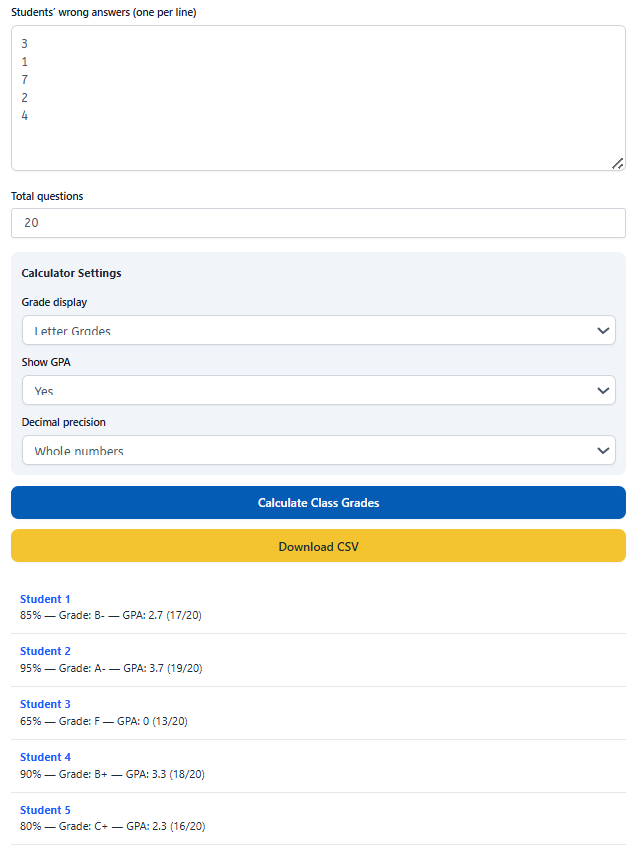
Student 1
- 3 wrong answers
- Teacher Grader instantly shows 85% (B)
- You mark the grade
- Time: about 20 seconds
Student 2
- 1 wrong answer
- Result updates to 95% (A)
- You record the grade
- Time: about 15 seconds
Student 3
- 7 wrong answers
- Grade appears as 65% (D)
- You move on
- Time: about 20 seconds
You repeat this simple step for each paper.
No formulas.
No mental math.
No stopping to double-check percentages.
Total time for 28 students: about 12 minutes
Add a few minutes to enter grades into your gradebook. You finish in 15 minutes. Manual grading for the same class often takes over an hour. That time adds up fast during the school year.
Why This Method Works?
1. You’re not doing math Your brain doesn’t have to calculate 17÷20 and then figure out what percentage that is. The calculator does it instantly.
2. No looking up grades You don’t flip back and forth to a grading chart. The letter grade appears automatically.
3. Fewer mistakes When you’re tired and doing mental math, errors happen. A calculator is always accurate.
4. Consistent grading Every student is graded by the same standard. No accidental rounding errors or judgment calls.
5. Works for any test size Whether you have 10 questions or 100, the process stays the same.
Common Grading Scenarios
Scenario 1: Different Question Values
Problem: Your test has multiple choice (1 point each) and essay questions (5 points each).
Solution:
- Add up total possible points (not number of questions)
- Mark point deductions on each paper
- Enter total points deducted as “wrong answers”
Example:
- Test has 50 total points
- Student loses 8 points
- Enter “50” total and “8” wrong
- Calculator gives their score
Scenario 2: Extra Credit
Problem: Some students earned bonus points.
Solution:
- Grade the base test first
- Add extra credit separately in your gradebook
Why? Mixing extra credit into the calculator makes the percentages confusing. Keep them separate for clarity.
Scenario 3: Curved Grading
Problem: The test was harder than expected. You want to add 5 points to everyone.
Solution:
- Subtract 5 from each student’s “wrong answers”
- Enter the adjusted number
Example:
- Student got 8 wrong
- You’re curving by 5 points
- Enter “3” as wrong answers instead
- Their grade adjusts automatically
Time Saving Tips Beyond the Calculator
1. Grade multiple choice first Multiple choice is fastest to check. Get those done, then tackle short answer or essay questions separately.
2. Use an answer key Place your answer key next to each paper. Mark wrong answers with a quick checkmark. Count them up at the end.
3. Grade in batches Don’t switch between grading and entering into the calculator. Grade 5-10 papers first, then enter all their scores at once.
4. Keep a tally sheet Write student names in a column. As you grade, write their wrong answers next to their name. Enter them all into the calculator later.
5. Skip detailed feedback during initial grading If you want to write comments, do that after you’ve finished all the grades. The calculator part should be pure speed.
What About Essay Questions?
Essay and short answer questions take longer to grade. That’s unavoidable.
But you can still use this system:
Step 1: Convert essays to point values
- Each essay is worth X points
- Decide how many points to deduct based on quality
Step 2: Mark point deductions
- Write “−2 points” or “−5 points” on the essay
Step 3: Add up total deductions
- Count all points lost across the test
- Enter that as “wrong answers” in the calculator
Example:
- Test is worth 50 points total
- Student loses 7 points on essays
- Enter “50” total and “7” wrong
- Calculator shows: 86% (B)
This keeps your grading process consistent across question types.
Grading Chart: See All Scores at Once
Want to see every possible grade for your test? The Class Grader shows you a complete chart.
Example for a 25-question test:
| Percentage Score | Grade | Correct Answers | Wrong Answers |
|---|---|---|---|
| 100% | A | 25 | 0 |
| 96% | A | 24 | 1 |
| 92% | A | 23 | 2 |
| 88% | B | 22 | 3 |
| 84% | B | 21 | 4 |
| 80% | B | 20 | 5 |
…and so on for all 25 rows.
This is helpful when you want to:
- Explain grades to students
- Show parents what each score means
- Print a reference chart for your desk
Just check the “Grading Chart” box in the calculator, and the full table appears.
Frequently Asked Questions (FAQs):
What is a Class Grader?
A Class Grader is an online tool that lets teachers calculate grades for an entire class at once. You enter the total questions and each student’s wrong answers one by one, and the calculator instantly shows percentages, letter grades, and GPA if needed.
How does a Class Grader save teachers time?
It removes repeated math. Instead of grading papers one by one, teachers grade the whole class in one click. This often cuts grading time by more than half.
Can I calculate GPA with a Class Grader?
Yes. Class grader allow GPA to be turned on or off. This is useful for middle school, high school, and college grading systems.
Is a Class Grader accurate?
Yes. It uses fixed math formulas to calculate scores. This reduces common mistakes that happen with manual calculations.
What types of tests work best with a Class Grader?
Class grader work best for objective tests like multiple-choice quizzes, true/false exams, math drills, and practice assessments.
Is a Class Grader allowed in schools?
Yes. Schools allow it because it is a calculator, not a testing aid. It only speeds up grading, not grading decisions.