
This Class Grader is designed for teachers and educators to help them grade an entire class in seconds. Paste students’ wrong answers, set the total number of questions, and instantly calculate percentages, letter grades, and GPA.
👉 Too many papers to grade? Save hours with our teacher grader. Try easy grader for single test grading.
Class Grader Calculator:
What is a Class Grader?
A class grader is a bulk grading calculator designed for teachers and educators. It helps them calculate grades for an entire class at once. Instead of grading students one by one, you enter how many questions each student got wrong. The class grader calculator instantly shows percentages, letter grades, and GPA.
It works for quizzes, tests, worksheets, and exams. It is ideal for busy classrooms and large class sizes.
Who is This Tool For?
This tool is built for:
- Teachers handling large classes
- College and school instructors
- Educators grading math, science, or objective tests
- Anyone who wants faster, accurate grading
It is especially useful for grading systems where percentages, letter grades, and GPA are required together. It works as a class grade calculator, test grade calculator, and class grader online—all in one place.
How to Use the Class Grader Online?
Enter wrong answers
Type each student’s number of wrong answers on a new line. Enter one number per student. Example: 4 means the student missed 4 questions.
Enter total questions
Add the total number of questions on the test. Use the same total for all students in the class.
Click “Calculate Class Grades”
Instantly see results for every student.
That’s it. No formulas. No spreadsheets. No manual math.
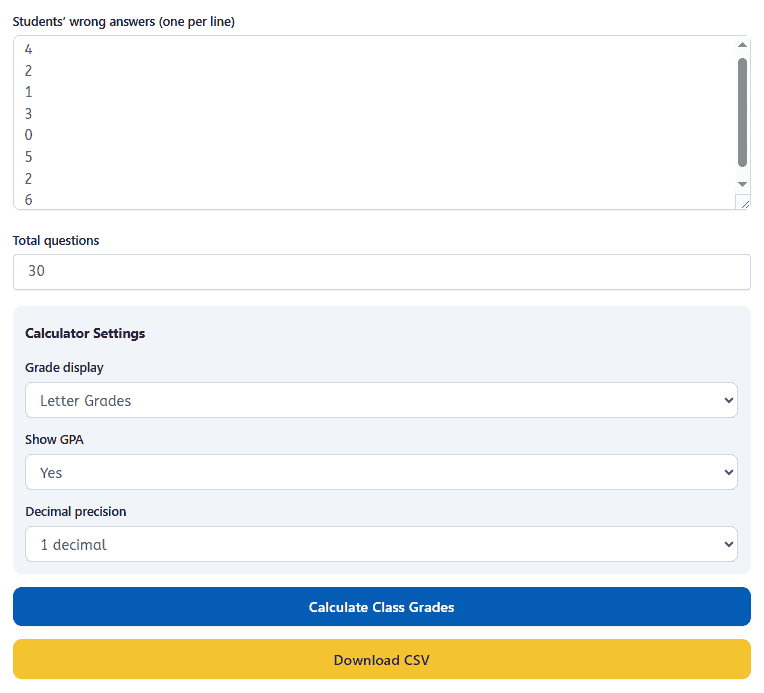
Customize Grading Settings:
- Choose letter grades or percentage only
- Turn GPA display on or off
- Set decimal precision
- Download results as a CSV file
Customize grading to match your school or college grading system.
These settings make the tool useful for:
- Class grader math
- Class grader percentages
- Class grader college grading systems
These options help teachers stay consistent across classes, departments and grading policies.
What Results You’ll See?
For each student, the tool shows:
- Percentage score
- Letter grade
- GPA (if enabled)
- Correct answers out of total
All calculations are instant and accurate.
Best Features of Class Grader Calculator:
You can reuse these under the intro:
- Grade multiple students at once
- Automatic percentage, letter grade, and GPA calculation
- Supports standard grading systems
- Download results as CSV
- Works instantly
- No login required
Why Teachers Love This Class Grader?
- Saves hours every week
- Reduces grading errors
- Works on mobile and desktop
- No login required
- Perfect for large classes
- Designed for real teaching days
- Built based on real teacher grading workflows
Unlike basic calculators, this tool grades the whole class at once.
When to Use a Class Grade Calculator?
This tool works best for:
- Multiple choice tests
- True/false quizzes
- Math drills
- Objective exams
- Practice assessments
For essays or creative work, grading still needs teacher review.
Is This Tool Accurate and Allowed?
Yes. The class grader uses fixed math formulas. It is more reliable than manual calculation. Schools allow it because it is a calculator, not a testing aid. It is used after assessments are completed, not during tests.
Helpful Tip for Faster Grading
Group similar assessments together. Enter wrong answers in one batch. Download the CSV and upload grades directly to your gradebook. This is how teachers cut grading time by 50–75%.
Frequently Asked Questions About the Class Grader
What is a class grader?
A class grader lets teachers calculate grades for an entire class at once. Instead of grading one paper at a time, you enter wrong answers and get instant percentages and letter grades. Easy Grader is perfect for grading one student or one test at a time. Use Teacher Grader to quickly grade multiple papers or tests in batches.
How does the class grader work?
You enter the total number of questions and each student’s wrong answers. The tool instantly calculates correct answers, percentages, and grades for every student. There are no formulas to remember. Everything is automatic.
Who should use a class grade calculator?
This tool is ideal for teachers with large classes. It is especially helpful for middle school, high school, college, and subjects with heavy testing.
If you grade one student at a time, use the Teacher grader instead. If you grade whole classes, this tool saves hours.
What types of tests work best with a class grader?
Class graders work best for objective assessments. This includes multiple-choice tests, true/false quizzes, spelling tests, math drills, and short answer worksheets. They are not designed for essays or creative writing.
Can this tool really save teachers time?
Yes. Teachers save the most time by removing manual math and repeated steps. Instead of calculating grades one by one, you grade the entire class in seconds. This often cuts grading time by more than half.
Is the class grader accurate?
Yes. It uses fixed math formulas to prevent calculation errors. Manual grading mistakes are more common than calculator errors.
Can I use the class grader on my phone?
Yes. The tool works on phones, tablets, and desktops. Mobile friendly grading is essential for teachers who grade anywhere.
Is this class grader free to use?
Yes. EasyGraderHub tools are free and require no signup. You can start grading immediately.
Can students use a class grader?
This tool helps students understand grading and track scores. It’s a learning tool, not a grade boosting shortcut
Does using grading tools make teachers lazy?
No. Grading tools save time, not effort. Teachers still design tests, review work, and make final decisions. The tool simply removes unnecessary calculations.
When should I use Easy Grader instead?
Use Easy Grader when you need to grade one student or single test grading. It is fast, simple, and perfect for quick checks. Use the Class Grader when grading many students together.
When should I use Teacher Grader?
Use Teacher Grader when you want more control over individual grading. It is a teacher focused grading tool. Best for daily classroom grading and quick score checks.
How do teachers grade faster without cutting corners?
Teachers grade faster by removing manual steps, not by skipping review. Tools like Easy grader calculator instantly handle math, while automated quizzes score objective questions. This lets teachers focus on accuracy, feedback, and instruction instead of calculations. For quick test scoring, many teachers start with an Easy Grader before entering grades.
How long should grading take for teachers?
Grading time depends on class size and assignment type. Objective assessments should take minutes, not hours. With grading tools, teachers often finish quizzes and tests in one sitting instead of over several days.
What tools actually cut grading time by 75%?
No single tool does everything. Teachers reach a 75% reduction by combining tools. Teacher grade calculator handle scores, class graders process many students at once, and automated quizzes reduce repetitive checking. When these tools are stacked, the time savings add up quickly.
What is the difference between Easy Grader and Teacher Grader?
Easy Grader is designed for fast, single-test scoring. Teacher Grader adds more flexibility and control, making it better for repeated use across classes. Many teachers use Easy Grader for quick checks and Teacher Grader for daily classroom grading.
Which grading tool works best for large classes?
Class grading tools work best when teaching many students. They allow teachers to enter wrong answers for the entire class and generate grades in one click. The larger the class, the more time these tools save compared to manual grading.
Can grading tools really reduce teacher burnout?
Yes. Grading tools reduce repetitive work, late nights, and mental fatigue. When teachers spend less time calculating grades, they have more energy for lesson planning, student support, and personal time. Small time savings each week make a big difference over a school year.
Are grading calculators accurate?
Yes. Grading calculators use fixed formulas. They eliminate common human errors like miscalculations or skipped questions. In most cases, calculators are more consistent than manual grading.